

Google AutoDraw




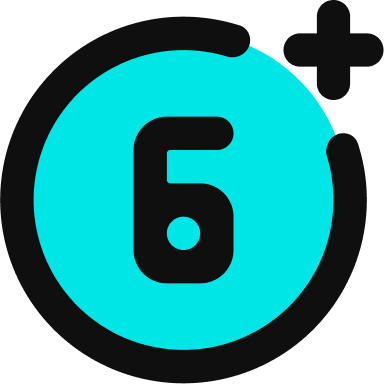


Google AutoDraw is a free browser-based drawing tool that uses machine learning to recognise your rough sketches and suggest polished clip art replacements.
Built by Google Creative Lab in 2017, it runs on the same neural network that powers Quick, Draw!. As you sketch, the AI analyses your strokes in real time and shows a suggestion bar at the top of the screen with icons it thinks match your drawing.
Tap a suggestion and your messy doodle becomes a clean, professional illustration. It's like autocorrect for drawings.
The canvas includes a full toolkit: freehand draw, text, shapes, fill bucket, colour picker, and export to PNG. No account needed, no ads, completely free. Works in any browser on any device.
For families, AutoDraw sits in an interesting spot. It builds creative confidence for kids who think they can't draw, and it teaches AI concepts hands-on (your child watches a machine try to understand their sketch in real time). Teachers have documented classroom activities from vocabulary visualisation to story illustration. But the AI suggestion feature can also discourage freehand creativity if kids default to tapping pre-made icons instead of developing their own drawing skills.
Video tutorial
Safety



Key Features
AI sketch recognition analyses your drawing strokes in real time and displays a suggestion bar of polished clip art icons it thinks match what you're drawing. Tap to replace your doodle instantly.
Zero friction to start requires no account, no download, no payment. Open autodraw.com in any browser and draw. Works on desktop, tablet, and phone with touch support built in.
Full creative toolkit includes freehand drawing, text with multiple fonts, geometric shapes, fill bucket, colour picker, and PNG export. Kids can create complete illustrated scenes, not just single icons.
AI literacy through play teaches kids how machine learning prediction works by showing them the AI's guesses updating live as they draw. Same concept as predictive text on a phone, but visual and interactive.
Family Projects
- Creating visual vocabulary cards by drawing a word and letting the AI suggest a polished icon, then adding the word with the text tool. Great for ESL/ELL learners and younger kids building word banks.
- Illustrating short stories or comics by using the AI suggestions for backgrounds and props while drawing main characters freehand. Teaches the difference between AI-assisted and original artwork.
- Designing birthday cards and invitations by combining AI-suggested icons with hand-drawn elements and text. Kids create something they can download and print.
- Building an "All About Me" collage by drawing favourite foods, hobbies, pets, and family members, then replacing selected sketches with clean icons for a polished final poster.
Pricing