ChatGPT Images 2.0 for Kids: 6 Weekend Activities
.webp)
ON THIS PAGE
Subscribe To Get Weekly Family AI Discoveries

- Character consistency across multiple images is the big new capability, and the one parents will actually use
- Legible text rendering finally works, which unlocks posters, magazine covers, and educational infographics
- Six ready-to-use copy-paste prompts below, each with age range and realistic time estimate
- Free tier is enough to try all six activities, but caps after 3-5 images per 3-hour window, so space them out
- Printable PDF guide included for sticking on the fridge
OpenAI released ChatGPT Images 2.0 on 21 April 2026. Unlike most AI launches, this one actually matters if you have kids at home.
The new model finally does two things the old ones could not: keep a character consistent across multiple images, and render legible text inside them. That means comic strips where the hero's face stays the same across all six panels. Magazine covers with your child's name spelled correctly. Classroom-quality infographics with accurate labels.
I am testing all six activities below with my kids this weekend and writing the follow-up post next week. But the tool is brand new, and if you want to try these over the weekend, here is everything you need to get started.
Not sure which tool is right for your child?
Take our free 2-minute quiz and get personalized AI tool recommendations based on your child's age and interests.
OpenAI just dropped a new image model. Here's why parents should care.
Three days ago, OpenAI quietly released ChatGPT Images 2.0 — and unlike most AI launches, this one actually matters if you've got kids at home.
Here's the short version: earlier AI image tools were great at making one cool picture and terrible at everything else. Ask for the same character twice and you'd get two different characters. Ask for a comic strip and the hero would change faces between panels. Ask for a storybook and your child would lose interest by page three because "that's not the same monster, Dad."
ChatGPT Images 2.0 fixes the thing that was actually blocking family creative projects. It can now:
The first two are the real unlocks. Character consistency is what makes comics and posters actually work instead of producing six different-looking heroes. Legible text is what turns "cool AI picture" into "thing I can print and stick on the wall."
I'm testing all six of these activities with my kids this weekend and writing the full "what actually happened" post next week. But I didn't want to sit on the prompts until then — the tool is brand new, and if you want to try these over the weekend, here's everything you need.
Each activity below includes:
You can try all six on ChatGPT's free tier — though you'll hit a cap after 3-5 images per 3-hour window, so space the activities out across an afternoon rather than trying to rattle through all six in one go. Plus lifts that cap and unlocks "thinking mode," which helps the model reason about layout for activities like the infographic and the sports poster.
1. Design your own character from every angle — 15 minutes, ages 6+
.webp)
Your child invents a character — a creature, a hero, a robot, anything — and ChatGPT Images 2.0 generates it from the front, side, back, and in an action pose. All four look like the same character, which is the bit that used to be impossible.
This is the foundation activity. The character sheet you generate here can be reused in all the other activities — the comic, the magazine cover, the poster. One prompt, a week of creative projects.
The prompt to use:
Create a character sheet with 4 poses of the same character: front view, side view, back view, and an action pose. Character: [your child's description]. Keep the character exactly the same in all four poses. Clean white background, illustration style.
Download the sheet and print it. This becomes the reference for every other project your child wants to build around this character.
2. Turn their bedtime story into a comic — 20-30 minutes, ages 7+
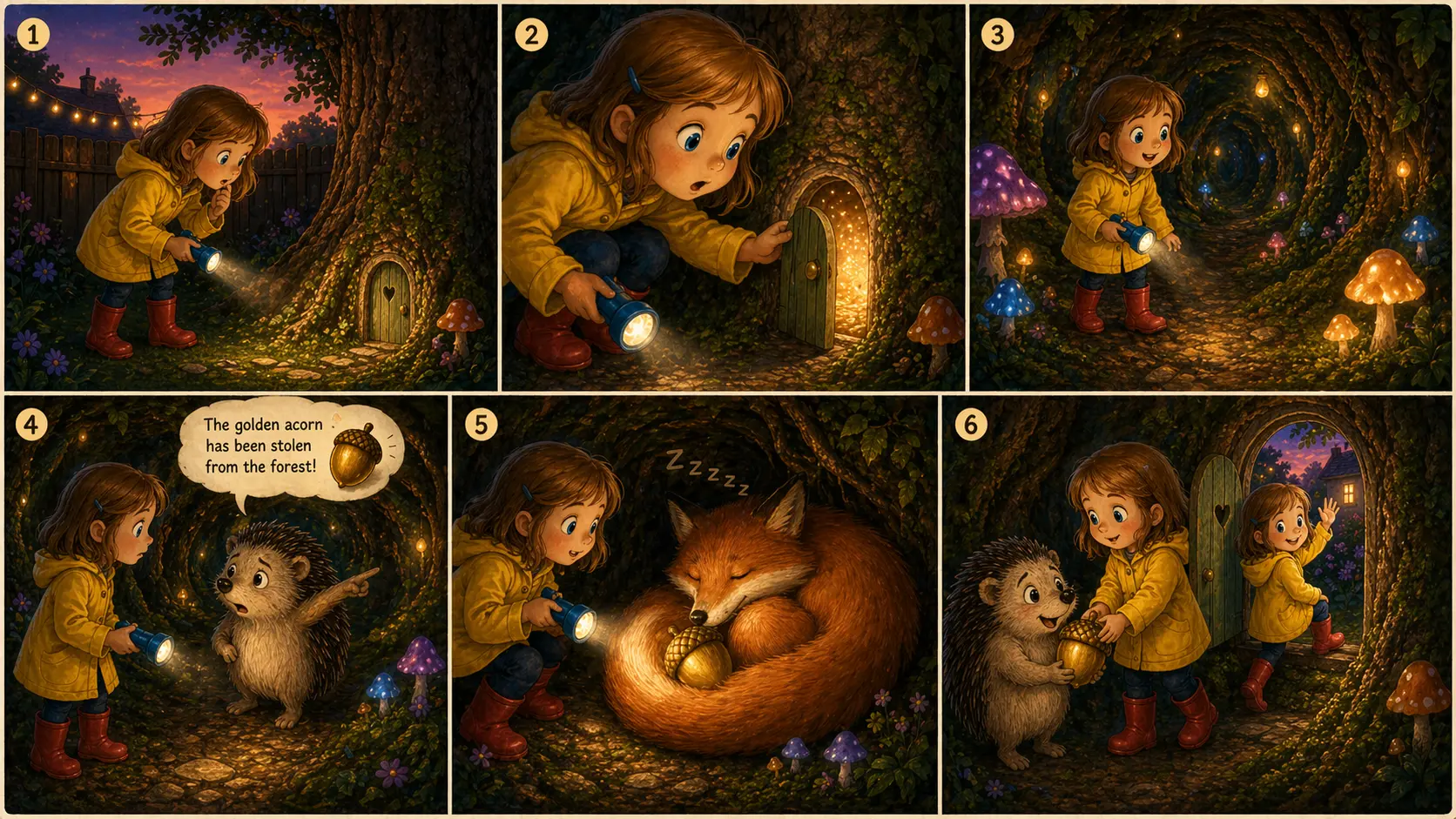
Your child tells a short story in six beats, and ChatGPT Images 2.0 turns it into a comic strip — with the same character in every panel and legible speech bubbles where it fits.
This is the headline new capability of the 2.0 model, and it's the one that broke in every previous version of AI image tools. Before, you'd get six different-looking heroes wandering through unrelated scenes. Now you get a proper comic.
How to set it up:
Before you touch ChatGPT, write down the six story beats with your child on paper. Beginning, problem, attempt, twist, solution, ending. It sneakily becomes a writing exercise, and the prompt works better when the beats are concrete.
The prompt to use:
Create a 6-panel comic. Main character: [description]. Panel 1: [beat]. Panel 2: [beat]. Panel 3: [beat]. Panel 4: [beat]. Panel 5: [beat]. Panel 6: [beat]. Keep the character and art style identical across all panels. Include speech bubbles.
Print it, let them illustrate the cover themselves, and you've got a hand-finished comic starring their own character.
3. Put their face or character on a magazine cover — 10 minutes, ages 6+

ChatGPT Images 2.0 can finally render legible text inside images. Your child — or the character they designed in Activity 1 — can star on a magazine cover with their own headline, spelled correctly.
This one is the "stick on the fridge" activity — quick, hugely satisfying for kids, and a great way to start a Saturday morning before moving on to bigger projects.
The prompt to use:
Create a realistic magazine cover for a magazine called "[name]". Cover features [character description]. Main headline: "[their headline]". Include volume number, date, and small sub-headlines. Professional glossy magazine style.
If you want your child's real face on the cover, upload a photo with the prompt and reference it directly. If you've already done Activity 1, upload the character sheet instead and the character will stay consistent with what they designed.
4. Make an infographic about what they're learning — 15 minutes, ages 8+

Pick a topic your child is curious about — the water cycle, the solar system, how volcanoes work, a Minecraft mob — and ChatGPT Images 2.0 produces a classroom-quality infographic with accurate labels and diagrams.
This is the one that parents quietly love. It doubles as homework help for topics they haven't covered in school yet, and the output is genuinely wall-worthy. The trick is picking one concrete topic — broad topics produce messy infographics.
The prompt to use:
Create an educational infographic explaining [topic] for an [age]-year-old. Include 4 to 5 key facts with clear labels, simple diagrams, and one surprising fact at the bottom. Bright, classroom-friendly colours. All text clearly legible.
Print it A4 or A3 and it belongs on the wall. This is also the activity where the Plus plan's thinking mode makes the biggest difference — it takes the time to reason about layout before generating, which shows.
5. Create a sports poster of last night's game — 10 minutes, ages 6+

ChatGPT Images 2.0 can now render legible text, real team colours, and — if you're on Plus — pull live scores and stats from the web. That means you can turn last night's match into a commemorative poster with accurate score, date, and player names.
This one hits hard for sports-mad kids. Imagine waking up on Sunday morning to a poster of yesterday's game, their favourite team, the final score, and a headline. Stick it on the fridge before they come down for breakfast.
How to set it up:
Ask your child which game they want to commemorate. If you're on the free plan, look up the score, date, and one key player name yourself before writing the prompt. If you're on Plus, thinking mode will search the web for you.
The prompt to use:
Create a commemorative sports poster for [team] vs [team], [date]. Final score: [score]. Key player: [name]. Design in official team colours with a bold headline and stats around the edges. Professional sports magazine style.
Print it A3 if you can. It really earns the wall space.
6. Build a town scene with 100 hidden things — 15 minutes, ages 5+

One detailed illustrated scene packed with 100 specific items — and a numbered legend above it listing every one. Print it big and turn it into a seek-and-find game.
The outputs are properly impressive when they land. Worth flagging upfront though: the model occasionally duplicates or garbles items in the legend, so you may need to regenerate once if the list looks off. It's still a brilliant picture either way.
How to set it up:
Pick a setting with your child — a mountain town, a harbour, a zoo, a city centre, a festival. Coherent places work better than random lists because the model has something real to draw around.
The prompt to use:
Create a single detailed wide-format illustration of [setting], packed with exactly 100 visible items. Above the illustration, include a numbered legend listing all 100 items from 1 to 100 in 5 clear columns of 20. Every item in the legend must appear somewhere in the scene. Richly detailed, realistic illustration style with warm natural lighting.
Print A3, hand over a pencil, and let them tick items off.
From still image to short film
Here's where this gets interesting beyond this weekend.
Last week I wrote about Seedance 2.0, the AI video tool that can animate a still image into a short clip. The two tools pair properly: generate the character sheet in ChatGPT Images 2.0, then drop it into Seedance and watch the character run. Animate the sports poster moment. Bring the town scene to life.
It's the full creative arc — your child designs it, then directs it. I'll be writing that combined workflow up properly in a couple of weeks once I've tested it with the kids. For now, the Seedance post is here: Seedance 2.0 review.
Get the printable PDF
I've turned these six activities into a printable PDF you can stick on the fridge and pick from. Each card has the prompt, age range, time estimate, and an example image. Grab it below — it's free.
Free printable PDF guide
All 6 activities with prompts, age ranges, and time estimates. Stick it on the fridge.
What I'm testing this weekend — and what's coming next
Next week I'll publish the follow-up: What my kids actually made with ChatGPT Images 2.0. Which activities held attention, which flopped, what the outputs actually looked like, and where the prompts needed tweaking. If you want it in your inbox when it lands, the newsletter signup is at the bottom of this page.
Try them this weekend and tell me what your kids made. Honestly, the stories that come back are the best bit.