Transform Movie Scenes Across Different Styles (Zootopia AI Project)
ON THIS PAGE
Subscribe To Get Weekly Family AI Discoveries

My kids wanted to see what the Zootopia DMV scene would look like in other movies.
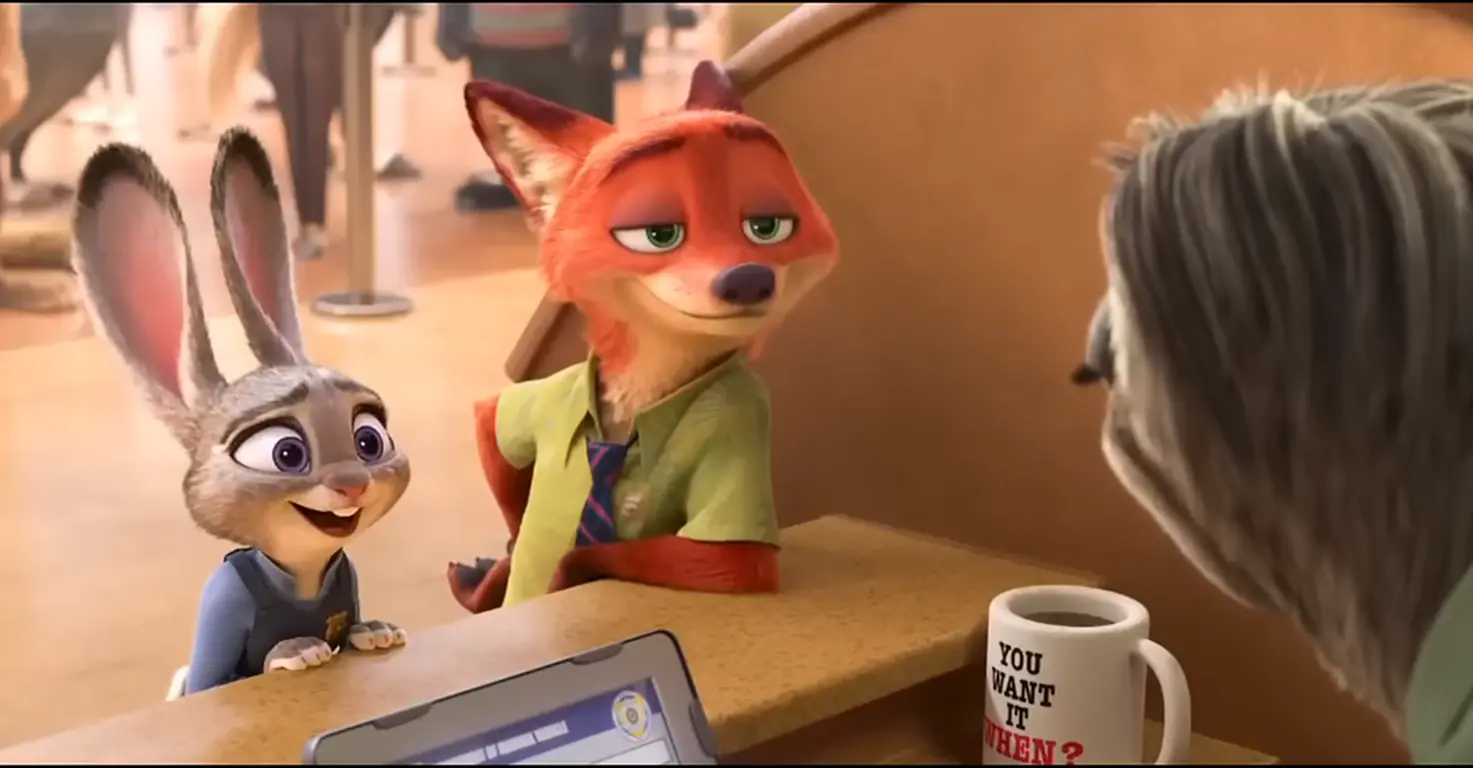
We selected the iconic Flash the sloth scene. Three characters at a service counter. Simple composition. Perfect for AI transformation.
Using ChatGPT for prompts, Nanobana Pro for image generation, and Kling 01 for video, we created 4 complete transformations. Toy Story, Inside Out, Finding Nemo, and Moana. Each one maintaining the exact character positions and scene composition.
Avatar failed completely after 5 attempts. The Na'vi transformation showed hybrid animal features. Abandoned.
Total time: 90 minutes first attempt. Total cost: 240 Kling credits out of 3,000 monthly allocation. Kids watched the final stacked video 5 times.
This guide shows you the complete process. Exact prompts. Failed attempts. Credit costs. Step-by-step Premiere Pro settings. Everything you need to replicate this with your family.
Quick overview
- Time: 90 minutes for first project (60 minutes for subsequent projects)
- Cost: 240 Kling credits per project (8% of 3,000 monthly allocation)
- Difficulty: Intermediate (expect multiple failed attempts at first)
- Age range: 8-12 years
- Key learning: Copy proven prompt structures instead of writing from scratch
- What you'll create: 5-strip stacked vertical video showing original scene plus 4 movie style transformations
What you'll need
Tools:
- ChatGPT (Free tier works, Plus $20/month recommended for faster responses)
- Higgsfield with Nanobana Pro (subscription required)
- Kling 01 (60 credits per 5-second video, 3,000 credits monthly)
- Premiere Pro ($22.99/month) or CapCut Desktop (free)
- Screen recording software to capture movie scene
Time investment:
- Scene selection and prep: 10 minutes
- Image generation with Nanobana: 30-45 minutes
- Video generation with Kling: 25 minutes
- Stacking in Premiere Pro: 15-20 minutes
Your child's input:
- Scene selection (which movie to transform)
- Movie style choices (which 4 styles to try)
- Character replacement ideas
Parent skills:
- Basic video editing (cropping, positioning)
- Copy-paste prompts (no writing required)
- File management and exports
Optional:
- Music library for final edit
- Social media accounts to share results
Not sure which tool is right for your child?
Take our free 2-minute quiz and get personalized AI tool recommendations based on your child's age and interests.
Step-by-step process
This workflow transforms one source scene into 4 different movie styles. Each transformation maintains exact character positions and composition.
Phase 1: Source scene selection and preparation (10 minutes)
Step 1: Choose your movie scene
Select a scene with 2-4 clearly defined characters. Service counters, tables, and doorways work best. Avoid action sequences or crowds.
I selected the Zootopia DMV scene. Judy and Nick at the counter. Flash the sloth behind it. Simple three-character composition.
Screen-record 10 seconds. Screenshot the first frame for image generation reference.
Step 2: Prepare video in Premiere Pro
Import your 10-second clip. Create new sequence with custom dimensions.
My settings:
File → New → Sequence
Horizontal: 1920
Vertical: 384 (this is 1/5th of 1080 for stacking)
Frame Rate: 30fps
Name: Zootopia Strip - Original
Drag clip into sequence. Adjust Position Y value to center characters in the thin strip. Focus on faces.
Export as MP4, H.264, 5 seconds. This becomes your base video for Kling transformations.
💡 Pro Tip: Creating the thin strip format (1920x384) FIRST means Kling outputs the same dimensions. Saves you from cropping 5 videos later.
Phase 2: Image generation with Nanobana Pro (30-45 minutes)
Step 3: Generate transformation prompts with ChatGPT
Upload your screenshot to ChatGPT. Use this prompt template for each movie style.
Can you write me a detailed prompt that I can give to Nanobana Pro, using the attached reference image, to transform this scene into the style of the [MOVIE NAME] movie?
This is a scene recreation task. I need to maintain the EXACT composition, camera angle, framing, and character positions from the reference image, but replace the characters with [MOVIE NAME] characters.
Character replacements:
- The rabbit character (left position, at the counter) should be replaced by [CHARACTER NAME]
- The fox character (center-left position, at the counter next to the rabbit) should be replaced by [CHARACTER NAME]
- The sloth character (right position, behind the counter, facing away) should be replaced by [CHARACTER NAME] shown from the back only
Important requirements:
- [CHARACTER 1] and [CHARACTER 2] should be standing AT the counter together (customer side), close to each other, with their heads at approximately the same height in frame
- [CHARACTER 3] should be behind the counter, completely facing away. We only see the back of their head and body
- The counter/desk setup should be maintained
- Transform the environment to [MOVIE SETTING]
- Complete character replacement. No hybrid or animal features. These should be 100% the actual [MOVIE NAME] characters
- Maintain exact spatial relationships and composition from the reference image
Result: ChatGPT generates a detailed 200-300 word prompt with exact positioning, environment details, and style specifications.
My movie choices:
- Toy Story: Jessie, Woody, Rex in Andy's room with cloud wallpaper
- Inside Out: Joy, Fear, Sadness at glowing control panel in Headquarters
- Finding Nemo: Dory, Marlin, Sea turtle at underwater coral reef
- Moana: Moana, Maui (with animated tattoos), Heihei rooster in tropical village
Step 4: Generate images in Nanobana Pro
For each movie style, go to Higgsfield and navigate to Nanobana Pro.
Upload your Zootopia screenshot. Paste the detailed prompt from ChatGPT. Click Generate.
Review results. Check for complete character replacement with no animal features. Verify exact positioning matches the original. Confirm the back-view character is facing away.
My iterations:
- Toy Story: 2 generations (first was good)
- Inside Out: 1 generation (perfect first try)
- Finding Nemo: 3 generations (adjusted color saturation)
- Moana: 2 generations (refined Maui's tattoo detail)
- Avatar: 5 failed attempts, abandoned (characters showed hybrid features)
Download the best result for each style. Total time: 30-45 minutes for 4 successful transformations.
💡 Pro Tip: Get all images perfect BEFORE moving to video generation. Nanobana iterations are unlimited. Kling charges 60 credits per video.
Phase 3: Video generation with Kling 01 (25 minutes)
Step 5: Transform videos in Kling 01
Go to Kling website. Navigate to Kling 01. DO NOT use Motion Control (it rejects animated characters).
For each of your 4 movie styles, upload three things:
- Video (required): Your 1920x384 Zootopia strip
- Image: The corresponding Nanobana-generated transformation
- Text prompt: Simplified version describing the transformation
Example prompt for Toy Story:
Transform this scene into Toy Story style. Jessie (cowgirl) and Woody (sheriff) at a desk in Andy's room. Rex the dinosaur behind desk facing away. Plastic toy aesthetic, cloud wallpaper, vibrant primary colors, warm bedroom lighting.
Settings:
- Resolution: 1080p (maintains aspect ratio)
- Duration: 5 seconds
- Quality: Auto
Click Generate. Wait 5 minutes per video. Download when complete.
Credits used: 60 credits per 5-second video × 4 videos = 240 credits (8% of 3,000 monthly allocation)
Rename files: 02_ToyStory.mp4, 03_InsideOut.mp4, 04_FindingNemo.mp4, 05_Moana.mp4
Phase 4: Stacking videos in Premiere Pro (15-20 minutes)
Step 6: Create vertical Instagram sequence
File → New → Sequence
Horizontal: 1080
Vertical: 1920 (9:16 Instagram/TikTok ratio)
Frame Rate: 30fps
Name: Zootopia Stacked Reel
Step 7: Import all videos
Import your original Zootopia strip plus all 4 transformation videos.
Step 8: Stack vertically
Drag each video to separate video tracks (V1, V2, V3, V4, V5). Position each strip using Effect Controls panel.
Exact positioning values:
- V1 (Bottom - Toy Story): Scale 56.25%, Position Y: 1728
- V2 (Second - Inside Out): Scale 56.25%, Position Y: 1344
- V3 (Middle - ORIGINAL ZOOTOPIA): Scale 56.25%, Position Y: 960
- V4 (Fourth - Finding Nemo): Scale 56.25%, Position Y: 576
- V5 (Top - Moana): Scale 56.25%, Position Y: 192
Step 9: Add labels (optional)
Create text graphics in left margin. Bold sans-serif font, white with black stroke. Label each strip with movie name.
Step 10: Export final reel
Format: H.264
Resolution: 1080 x 1920
Frame Rate: 30fps
Bitrate: 10-15 Mbps
Export as Zootopia_Stacked_Transformations_Final.mp4
What worked
Scene selection with clear character positions
Choosing the DMV scene was perfect. Three characters at defined locations. Customer service counter setup. Simple composition.
This translated across all movie styles. Counter became control panel (Inside Out), coral reef ledge (Finding Nemo), carved table (Moana), desk (Toy Story).
Lesson: Pick scenes with characters at fixed locations, not action sequences.
Detailed prompts with exact positioning
Adding comprehensive context at the beginning of prompts eliminated hybrid characters.
Starting with "This is a scene from Toy Story, NOT Zootopia" plus detailed position requirements (LEFT, CENTER-LEFT, RIGHT) gave clean replacements.
Lesson: Save your working prompt structure. Swap movie-specific details for future projects. This cut subsequent project time from 45 minutes to 15 minutes.
Using Kling 01 instead of Motion Control
Motion Control rejected the video with "No valid characters detected." Requires human or human-like characters.
Kling 01 multimodal generation accepted animated characters. Upload video plus image reference plus text prompt. Maintains original motion, transforms style.
Lesson: Always use Kling 01 for animated character transformations.
Thin strip format for stacking
Creating 1920 x 384 pixel strips (1/5th of 1920x1080) allowed perfect stacking into 9:16 vertical format.
Five strips stacked = 1080x1920 for Instagram/TikTok. Characters remained visible and recognizable.
Lesson: Create the thin strip in Premiere FIRST, then upload to Kling. Output maintains that aspect ratio.
What didn't work
Avatar transformation failed completely
Generated 5 images. All showed Nick and Judy with animal features visible. Blue skin mixed with fox and rabbit characteristics.
Why it failed: Na'vi are humanoid aliens. Transforming animal characters to humanoid aliens is too complex for current AI.
Time wasted: 20 minutes across 5 generation attempts
Lesson: Start with easier transformations (Toy Story, Inside Out). Avoid humanoid aliens or realistic humans.
Initial prompts created hybrid characters
First generations showed "Zootopia characters dressed as Toy Story characters." Fox features on Woody. Rabbit ears on Jessie.
Prompts started with "Transform this scene..." which implied modification, not replacement.
Time wasted: 20 minutes and several generation attempts
Lesson: Emphasize "complete character replacement" and "NO animal features" explicitly in prompts.
Motion Control rejection
Uploaded Zootopia video to Motion Control. Error: "No valid characters detected in the video."
Motion Control tracks human motion. Animated characters not supported.
Time wasted: 15 minutes trying different uploads
Credits wasted: 0 (rejections don't charge credits)
Lesson: Read tool requirements carefully. Kling 01 for animated characters, Motion Control for humans.
Premiere Pro black bars issue
Cropped video to thin strip in existing 1920x1080 sequence. Black bars appeared top and bottom.
Canvas size was still original dimensions. Content was cropped smaller.
Lesson: Create NEW sequence with exact dimensions (1920x384) BEFORE importing video. Don't crop in wrong-sized sequence.
Why this workflow works
The three-tool combination solves different problems.
ChatGPT generates detailed prompts with proper structure and positioning language. You don't need to know how to write prompts. Copy and swap movie-specific details.
Nanobana Pro creates high-quality style transformations with character replacement. Unlimited iterations mean you can refine until perfect before spending Kling credits.
Kling 01 maintains the original motion while applying the new visual style. This preserves timing, character movement, and scene dynamics.
Learning curve
First project takes 90 minutes. Expect failures. Avatar didn't work. Initial prompts created hybrids. Motion Control rejected the upload.
Second project takes 60 minutes. You have saved prompt structures. You know which tools to use. You understand the positioning requirements.
By the third project, you can complete transformations in 45 minutes.
Credit budget planning
Kling provides 3,000 credits monthly. Each 5-second video costs 60 credits.
One 5-strip project (4 transformations) uses 240 credits. That's 8% of monthly allocation.
You can create approximately 12 similar projects per month. Or 50 individual transformation videos.
Generate images first, refine until perfect, THEN commit to video generation. This prevents wasting credits on imperfect transformations.
Kids' engagement and reactions
Tested with 8, 10, and 12-year-olds. Immediate recognition of all movie styles. Excitement when spotting character transformations.
They watched the final video 5 times. Paused to examine each strip individually. Asked to watch it again the next day.
Follow-up questions: "Can we do this with other movies?" "Can I pick the scene next time?" "How does the AI know what Woody looks like?"
This became a discussion about AI training data, visual style consistency, and character design across different animation studios.
Getting the most out of these tools
Before you start:
- Watch through the movie with your child to pick the scene together
- Choose scenes with 2-4 characters (not crowds)
- Look for service counters, tables, doorways (clear spatial relationships)
- Screenshot and screen-record at the same time
During the process:
- Generate all 4 images in Nanobana BEFORE moving to Kling
- Review each image carefully for hybrid features before proceeding
- Test stacking with one transformation before generating all four videos
- Save your ChatGPT conversation to reuse prompt structures
What I'd do differently:
- Skip Avatar entirely (humanoid aliens too complex)
- Start with Toy Story (easiest transformation, distinct plastic aesthetic)
- Create a template document with working prompts for future projects
- Record the kids' reactions while watching for the first time
Platform comparison
- Pros: High-quality character replacements, unlimited iterations, good style matching
- Cons: Requires subscription, learning curve for optimal prompts
- Best for: Parents willing to experiment with multiple generations
- Pros: Maintains original motion perfectly, accepts animated characters, 3,000 monthly credits
- Cons: 60 credits per 5-second video, 5-minute generation time, can't preview before generating
- Best for: Final video transformations after images are perfected
These two tools together create a reliable workflow. Nanobana for unlimited image refinement. Kling for video transformation only after images are perfect.
Common issues and solutions
Problem: Character replacements look hybrid (animal features mixed with target characters)
Solution: Add "This is a scene from [MOVIE], NOT Zootopia" at the beginning of your prompt. Include "Complete character replacement, no hybrid features" in requirements. Specify "NO animal features" for each character. Regenerate 2-3 times if needed.
Problem: Kling rejects your video with "No valid characters detected" error
Solution: You're using Motion Control instead of Kling 01. Motion Control requires human characters. Use Kling 01 multimodal generation for animated characters. Upload video plus image reference plus text prompt.
Problem: Character positions don't match the original scene
Solution: Your prompt doesn't specify positioning clearly enough. Use "EXACT CHARACTER POSITIONS" section. Specify LEFT, CENTER-LEFT, RIGHT positions explicitly. Include relative height ("heads at approximately the same height"). Mention spatial relationships ("close together," "next to each other").
Problem: Black bars appear when cropping video to thin strip
Solution: Create NEW sequence with exact dimensions first (1920x384). THEN import and position video. Don't crop in existing 1920x1080 sequence. Method: File → New → Sequence → Settings → Custom dimensions.
Problem: Third character (back view) shows too much detail or is facing forward
Solution: Emphasize "back view only" more strongly in prompt. Add "WE ONLY SEE THE BACK OF [CHARACTER]'S HEAD AND BODY" in all caps. Specify "completely facing away" and "turned completely away, working behind the counter."
Problem: Running low on Kling credits
Solution: Monthly allocation is 3,000 credits (50 five-second videos). Generate shorter clips for testing (3 seconds uses 36 credits). Refine all images in Nanobana BEFORE moving to Kling. Don't waste credits on imperfect image transformations. Calculate: 5-strip project with 4 transformations uses 240 credits (8% of monthly allocation).