How We Used NotebookLM to Teach My 8-Year-Old About the Irish Famine
ON THIS PAGE
Subscribe To Get Weekly Family AI Discoveries

Last week, we surprised the kids with a Tenerife holiday reveal using an AI-generated treasure hunt. But before we left Ireland, there was one project I wanted to finish: teaching Mateo (8) about the Irish Famine using NotebookLM.
On New Year's Day, we were walking along Dublin's docks. He stopped at bronze statues: skeletal figures with bundles, heading toward ships.
"Dad, who are these people?"
Famine victims. The Great Irish Famine, 1845-1852.

He asked questions I couldn't fully answer. How did it start? Why couldn't they just eat other food? How many people died?
I could give him surface-level answers, but this deserved better. A lecture from me would last 5 minutes before his attention wandered. A history textbook wouldn't work. Too dense, too formal, too boring for an 8-year-old.
I remembered NotebookLM's ability to create podcasts from uploaded sources. What if I could create a custom educational podcast, one specifically designed for an 8-year-old, using age-appropriate sources, with clear definitions and a quiz at the end?
Two hours later, Mateo listened to a 10-minute conversation between two friendly podcast hosts explaining the Great Irish Famine. At the end, he correctly answered all 5 comprehension questions.
More importantly: he asked to learn about the Irish War of Independence next.
Here's exactly how I used NotebookLM to create engaging educational content for my son, including advanced features most parents don't know exist.
Tools
- NotebookLM account (free - notebooklm.google.com)
- Google account (required for NotebookLM)
- ChatGPT or Claude (free accounts) - for finding source recommendations
- Device for listening (computer, tablet, phone, Bluetooth speaker)
- 30-40 minutes total time (setup + listening)
Optional
- NotebookLM mobile app (iOS/Android) - for easier audio playback
- Bluetooth speaker - better than AirPods for young kids
- Gemini Pro subscription - unlocks unlimited audio generation (not necessary for one-time use)
Parent Skills
- Ability to evaluate sources for age-appropriateness
- Basic understanding of the topic you're teaching
- Willingness to fact-check AI-generated content
- Patience to let kids ask questions afterward
Materials
No physical materials needed. Everything happens digitally.
Not sure which tool is right for your child?
Take our free 2-minute quiz and get personalized AI tool recommendations based on your child's age and interests.
Why NotebookLM for Learning
The Problem with Traditional Learning
When kids ask questions about complex topics, parents face a dilemma:
What Made This Different From Other Learning Tools
I've tried other ways to teach Mateo complex topics. YouTube videos? Hit or miss on accuracy and age-appropriateness. Textbooks? Too dry. My own explanations? I lose his attention in 2 minutes.
NotebookLM solved three problems at once:
It Kept Information Accurate
Everything came from the sources I'd vetted. No hallucinations. No random internet facts. When the podcast hosts said "1 million people died," I could trace it back to the exact source I'd uploaded.
It Made Learning Feel Like Listening to Friends
Two podcast hosts having a conversation felt natural. Mateo wasn't being lectured. He was overhearing an interesting discussion. The conversational format held his attention for the full 10 minutes.
It Customized to His Exact Age
I told NotebookLM "8-year-old audience" and it adjusted everything: vocabulary, complexity, pacing. The hosts used analogies like comparing Ireland's population to U.S. states, which made abstract numbers concrete.
It Built In Comprehension Checks
I requested 5 quiz questions at the end to immediately test Mateo's understanding and retention. He got 5/5 correct, showing the information stuck.
It Created Multiple Learning Formats
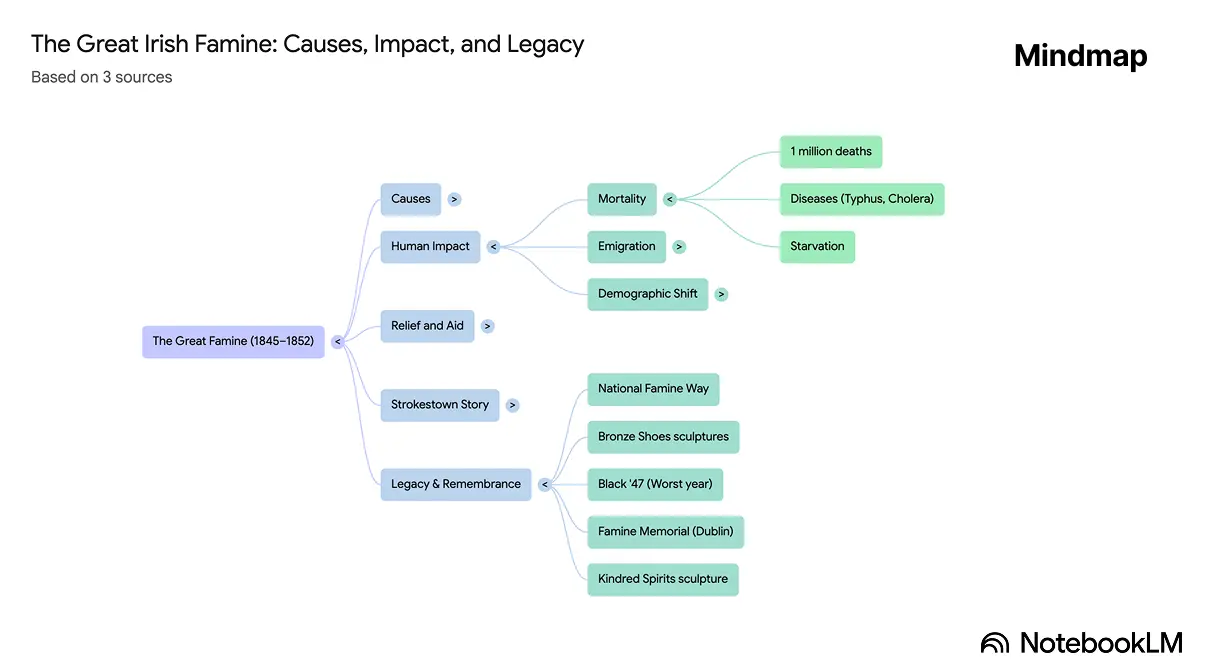
Beyond podcasts, I discovered NotebookLM can create flashcards, mind maps, infographics, video overviews, and study guides, all from the same sources I'd already vetted. (I didn't test all these formats with Mateo, but I'll explain what they do and when I'd use them.)
The Result: What would have taken me hours to research, organize, and present became a 30-minute setup that created professional-quality educational content tailored to Mateo's exact age and learning needs.
Step-by-Step Guide
📚 Step 1: Finding Age-Appropriate Sources
The Challenge: Not all historical sources are appropriate for young kids. Adult-level content about the Irish Famine includes graphic details about starvation, death, and suffering that might be too intense for an 8-year-old.
My Approach: I used ChatGPT and Claude to recommend age-appropriate sources before uploading anything to NotebookLM.
My exact prompt to ChatGPT:
I want to create a NotebookLM podcast for my 8-year-old boy on the subject of The Great Famine in Ireland. What sources do you suggest I use to create an informative, easy to understand podcast episode for him with a quiz at the end?
What I got back:
Why this worked: These sources balanced historical accuracy with emotional appropriateness. They didn't hide the tragedy, but they presented it in ways an 8-year-old could process.
NotebookLM has a built-in "Discover Sources" feature with two options:
For next time: I'd try "Fast Research" first to save time, but I'd still manually vet each source for age-appropriateness. The AI finds good sources, but it doesn't know your child's maturity level.
Time spent: 10 minutes (asking ChatGPT + reviewing recommendations)
✅ Step 2: Vetting Your Sources (Critical Step)
This is the step most parents skip. Don't.
NotebookLM reduces hallucinations by grounding responses in sources, but that doesn't help if your sources are biased, incomplete, or contradictory.
I ran three verification prompts (learned this from Futurepedia's NotebookLM tutorial):
Prompt 1 - Check for Contradictions:
Looking only at the sources in this notebook, identify any areas where the sources disagree with each other and any clear contradictions or conflicting claims.
What I discovered: My sources agreed on major facts (1 million deaths, potato blight cause, mass emigration) but one source said "nearly 1.5 million died" while others said "approximately 1 million." I noted this to simplify for Mateo as "about 1 million people died."
Prompt 2 - Identify Gaps:
Based on these sources, what important questions or subtopics about the Irish Famine are missing or barely covered? List the biggest gaps that would need to be filled to really understand this topic well. Do not invent details. Just describe what is missing.
What I discovered: My sources were heavy on statistics but light on personal stories. This is why the Daniel Tighe narrative (12-year-old boy's experience) became so important. It filled the emotional/personal gap.
Prompt 3 - Check for Alternative Viewpoints:
Are there any contrarian, alternative, or lesser-known viewpoints on the Irish Famine that are likely not represented in these sources? Describe those possible viewpoints at a high level and suggest what kinds of sources I would need to look for to find them.
What I discovered: My sources presented the British government's role fairly one-sidedly. For an 8-year-old, this was fine. But for older kids (12+), I'd want sources presenting more nuanced political perspectives.
After running these prompts: I saved each response as a "note" in NotebookLM for future reference, then deleted the chat history to start fresh for the actual podcast creation.
These three prompts took 5 minutes total but ensured I wasn't teaching my son incomplete or biased history. It's due diligence that builds trust.
Time spent: 5 minutes
📤 Step 3: Uploading Sources to NotebookLM
Process:
What NotebookLM did automatically:
How many sources: I uploaded 4 sources total. Free plan allows up to 50 sources per notebook, which is more than enough for most learning projects.
I could select/deselect sources before generating content. For this podcast, I kept all 4 active. For follow-up questions later, I might narrow to just Daniel Tighe's story for more specific details.
Time spent: 3 minutes
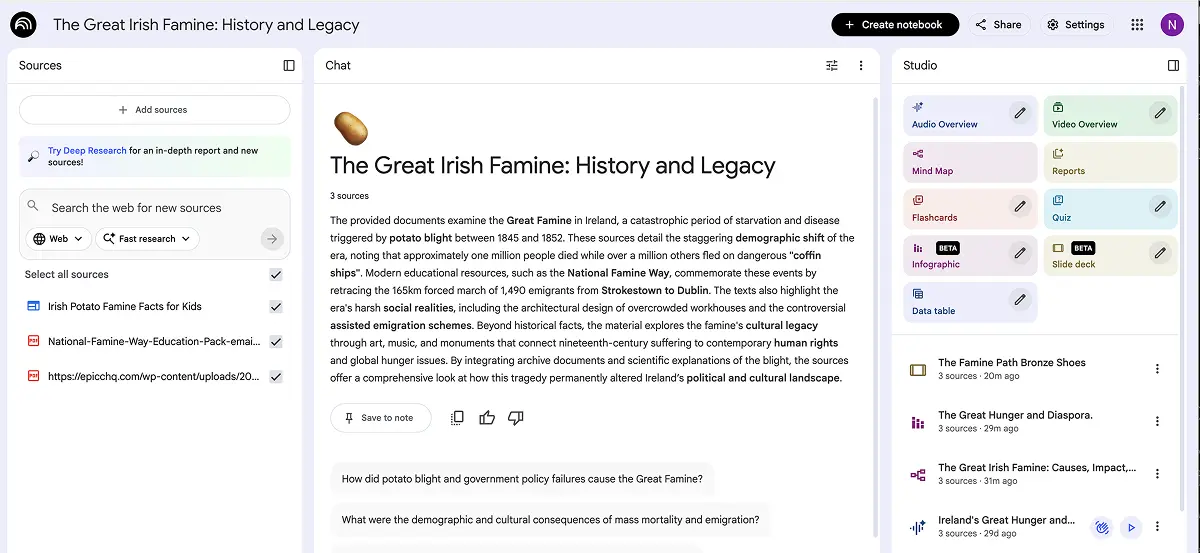
⚙️ Step 4: Configuring NotebookLM Settings
With all my sources uploaded, I had one more critical step before generating the podcast: customizing how NotebookLM would talk to Mateo.
Settings I Adjusted:
Act as a friendly history teacher explaining topics to an 8-year-old child. Use simple language, helpful comparisons, and define any difficult words clearly. Be honest about difficult topics but present them in age-appropriate ways.
Why these settings mattered:
"Shorter" worked well for Mateo (8), but for his next topic (Irish War of Independence), I'll try "Standard" response length to see if he can handle slightly more detail now that he's getting used to this format.
Time spent: 2 minutes
🎙️ Step 5: Creating the Audio Overview
Now came the moment of truth: generating the actual podcast. With my sources vetted and settings configured, I was ready to see if NotebookLM could turn all that prep work into something Mateo would actually want to listen to.
Process:
My exact prompt:
Create an educational podcast about the Great Irish Famine for an 8-year-old boy. Focus on telling the story through 12-year-old Daniel Tighe's experience to make it relatable. Explain what the potato blight was, why it caused such a terrible famine, and what happened to families like Daniel's.
Keep the tone engaging and age-appropriate. Be honest about the hardship without being overly graphic. Use simple language and helpful comparisons to explain difficult concepts.
Define these terms clearly within the conversation: famine, blight, potato crop, emigration, coffin ships.
End with 5 comprehension questions to test understanding:
1. What caused the potato blight?
2. How old was Daniel Tighe when he walked to Dublin?
3. Why couldn't Irish people just eat other foods?
4. What were coffin ships?
5. How many people died during the famine?
Make it feel like two friendly teachers are explaining an important piece of Irish history to a curious young student.
Alternative audio formats NotebookLM offers:
For this topic: Deep Dive was perfect for comprehensive learning. If I'd wanted to prep Mateo quickly before we saw those statues on Christmas Day, I would have used "Brief" format (3-5 minutes) instead.
Generation time: About 3-4 minutes
What NotebookLM created: A 10-minute podcast with two hosts (male and female voices) having a natural conversation about the Irish Famine, using Daniel Tighe's story as the narrative thread, defining terms clearly, using analogies (comparing population numbers to U.S. states), and ending with 5 quiz questions.
Time spent: 5 minutes (including prompt writing)
🎧 Step 6: The Listening Experience
Setup: I initially had Mateo listen using AirPods connected to my laptop. This was a mistake.
What happened: He wasn't used to wearing AirPods. They kept slipping out. He got distracted adjusting them. By minute 8, he was getting antsy.
Used the NotebookLM mobile app (free for iOS/Android) and played the podcast through a Bluetooth speaker in the kitchen while he had lunch.
Why this matters: The content was engaging, but the delivery method created unnecessary friction. For kids, especially young ones, ambient listening through a speaker works better than headphones.
The actual listening: Despite the AirPods issue, Mateo stayed engaged for the full 10 minutes. The conversational format worked. Two people discussing the topic felt more natural than a single narrator lecturing.
Key moments:
Quiz results: 5 out of 5 correct answers. He retained the information.
Post-listening: He asked: "Can we make one about the 1916 Rising?" This is the real success metric. He wanted more.
Time spent: 10 minutes (listening) + 5 minutes (post-discussion)
What Worked
✅ Daniel Tighe's Story Made It Relatable
Why it mattered: Abstract statistics (1 million deaths) are hard for 8-year-olds to grasp. But a 12-year-old boy walking 165 kilometers to Dublin with his starving neighbors? That's concrete. Mateo could imagine himself in Daniel's shoes.
Lesson: Always include a personal narrative when teaching kids about historical events. Numbers inform, but stories connect.
✅ Defining Terms Within the Conversation
What happened: The podcast hosts didn't just use words like "famine" and "blight". They defined them conversationally as they went.
Example: "So when we say 'blight,' we're talking about a kind of disease that attacked the potato plants. It made them rot and turn black, so they couldn't be eaten."
Why this worked: Mateo didn't have to stop and ask what words meant. The definitions were built into the narrative flow.
Lesson: Explicitly request that AI define complex terms within the content itself, not in a separate glossary.
✅ The Quiz Reinforced Learning Immediately
What happened: 5 comprehension questions at the end forced Mateo to recall what he'd just learned. Getting all 5 correct boosted his confidence and showed me he'd actually retained the information.
Why this worked: Immediate testing is better than delayed testing. The information was fresh, and success felt achievable.
Lesson: Always include a quiz component. Even 3-5 simple questions make a huge difference in retention.
✅ Free and Unlimited (Mostly)
This entire project cost £0. NotebookLM's free plan allows:
I used one audio generation. Didn't hit any limits.
For families on budget: This is accessible. No subscription required for occasional educational projects.
What I Wish I'd Known: Interactive Mode
The feature I didn't discover until after: NotebookLM's audio overviews have an interactive mode where you can jump in during the podcast and ask questions in real-time.
How it works: While the podcast is playing, there's a button to "interrupt" the hosts. You (or your child) can ask a question, and the AI hosts will pause, answer it conversationally, then continue where they left off.
Why this is incredible for kids: When Mateo asked "Wait, they ONLY ate potatoes?", I had to pause the audio and explain. With interactive mode, he could have asked the podcast hosts directly, and they would have answered in their conversational style using information from the uploaded sources.
How to Use Interactive Mode Effectively
When to Use Interactive Mode
When to Skip It
How to activate it: During podcast playback, look for the microphone or "Ask" button. Click it, ask your question, and the hosts will respond.
I'll absolutely use interactive mode for Mateo's next topic (Irish War of Independence). It transforms passive listening into active learning. Kids can get clarification the moment confusion arises.
Features I Discovered Too Late (But Will Use Next Time)
After finishing the podcast with Mateo, I dove deeper into NotebookLM and discovered it can create multiple learning formats from the same sources I'd already vetted. I didn't test these with him yet, but here's what they do and when I'll use them for his next topic (Irish War of Independence):
📇 Flashcards
What they are: Digital flashcards with customizable difficulty levels
How to create: Click "Studio Panel" → "Flashcards" → Select number of cards and difficulty
When I'll use them: For vocabulary retention. I'll generate 10 flashcards about key terms (famine, blight, emigration, workhouse, coffin ship) and review them with Mateo 2 days after the podcast to test spaced repetition.
Why this should work: Spaced repetition helps long-term retention. One 10-minute podcast + 5 minutes of flashcards two days later = much better learning outcomes.
🗺️ Mind Map
What it is: Visual diagram showing how concepts connect
How to create: Click "Studio Panel" → "Mind Map"
When I'll use it: For complex cause-and-effect topics. A mind map showing potato blight (center) branching to crop failure → starvation → evictions → emigration → death would help visual learners like Maria understand connections spatially.
Why this should work: Some kids understand better when they can see how events connect rather than just hearing about them linearly. I'll test this with Maria (10) on her next history topic.
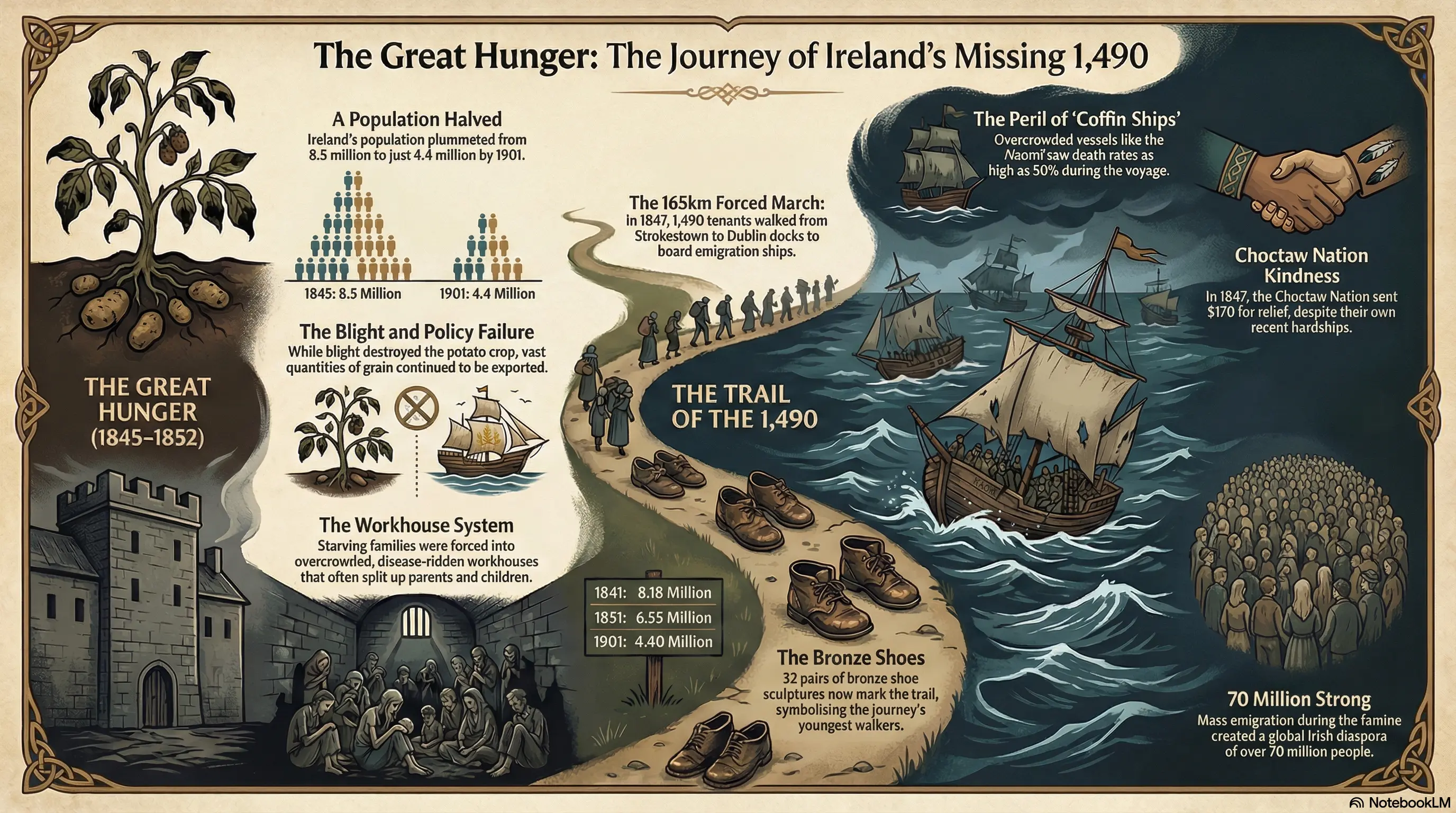
📊 Infographic
What it is: Visual data representation using Imagen (Google's image generator)
How to create: Click "Studio Panel" → "Infographic" → Choose detail level and style
Customization options:
When I'll use it: For timeline-heavy topics. A visual timeline showing 1845 (blight appears) → 1846-47 (peak starvation) → 1848-52 (mass emigration) would make the 7-year span more concrete.
I read that detailed infographics sometimes have text errors. I'll stick to concise or standard for accuracy when I test this.
🎬 Video Overview
What it is: Slide deck with AI-generated voiceover explaining content step-by-step
How to create: Click "Studio Panel" → "Video Overview" → Choose format and visual style
Format options:
Visual styles: Heritage, Whiteboard, Modern, Cyberpunk
When I'll use it: For kids who prefer watching to listening. If Conor (6) asks about a historical topic, I'll try a 5-minute Brief video with historical imagery to see if visual + audio works better for his age.
Why this should work: Combines visual slides + narration + source accuracy. Like a mini-documentary tailored to your child's exact age and learning level.
Features I'll Use When Mateo's Older (10+)
Mateo's only 8, so I skipped some NotebookLM features that are better for tweens and teens. But when he's ready for more complex thinking, here's what I'll try:
🎙️ Debate Format
What it is: Two AI hosts argue different perspectives on a topic
When I'll use it: When Mateo's 12+ and studying the Famine in school, I could create a debate:
Why this should work for older kids: Teaches critical thinking. Kids learn that historical events can be interpreted differently. Develops analytical skills.
Age recommendation: 12+ (younger kids like Mateo might find multiple perspectives confusing)
🧠 Create a Custom Gemini Tutor
What it is: A permanent AI assistant that has access to your NotebookLM notebook
How to create:
What you'd get: A permanent tutor your child can ask questions to anytime, grounded in the sources you vetted.
Example questions Mateo could ask when he's older:
Why I'd use this: Ongoing learning without me needing to be present. The Gem always has context from the sources I vetted.
I'll always supervise Mateo when using AI tutors until he's at least 13.
What Didn't Work
❌ AirPods for Young Kids
What happened: Mateo wasn't used to wearing them. They kept slipping out, creating distraction.
Solution: Use Bluetooth speaker or mobile app speaker mode. Ambient listening works better for kids under 10.
⏱️ 10 Minutes Was Slightly Too Long
What happened: By minute 8, Mateo's attention wandered. He was still listening, but less engaged.
Solution for next time:
Lesson: Match content length to attention span. 6-8 minutes is sweet spot for 8-year-olds.
📱 Laptop Playback Instead of Mobile App
What happened: I played the audio through my laptop browser, then tried to transfer it to my phone for easier control.
Solution: Download the NotebookLM mobile app first. It's specifically designed for audio playback and makes pausing, rewinding, and controlling much easier.
Lesson: Use the right tool for the job. Mobile app for listening, desktop for creating.
Tips for Parents
✅ Vet Sources Yourself First
Don't blindly trust AI recommendations. Even ChatGPT/Claude can suggest sources that are:
- Too advanced for your child's age
- Too graphic for young kids
- Academically accurate but emotionally inappropriate
Always preview sources before uploading to NotebookLM.
✅ Run the Three Verification Prompts
Every time you create a learning notebook:
- Check for contradictions
- Identify gaps
- Look for missing viewpoints
Takes 5 minutes. Ensures quality education.
✅ Start with "Brief" Format for New Topics
Don't assume kids want deep dives immediately.
First exposure: 3-5 minute Brief overview
If engaged: Generate Deep Dive for more detail
If very engaged: Create flashcards, mind maps, infographics
Build complexity gradually.
✅ Use Interactive Mode
Let kids interrupt and ask questions. This is the killer feature most parents don't know about.
Encourage curiosity: "If something doesn't make sense, pause and ask the hosts."
✅ Listen Together First
Don't hand your kid headphones and walk away.
Listen together the first time. You'll catch:
- Moments of confusion (when to pause and explain)
- Inaccuracies (AI can still make mistakes)
- Topics that need more context
After the first listen, older kids (10+) can re-listen independently.
✅ Follow Up With Discussion
Don't end at the quiz.
Ask open-ended questions:
- "What surprised you most?"
- "How do you think Daniel Tighe felt?"
- "What would you do if you were living then?"
These questions build empathy and critical thinking beyond factual recall.
Other Topics This Works For
This NotebookLM learning approach works for any topic:
History Topics
- World War II (age-appropriate sources)
- Civil Rights Movement
- Ancient Egypt
- American Revolution
- Vikings and Medieval Times
Science Topics
- How volcanoes work
- The solar system
- Dinosaurs and extinction
- Climate change (simplified)
- Human body systems
Current Events
- Elections (simplified for kids)
- Space exploration
- Environmental issues
- Technology developments
Literature
- Book companion for required reading
- Author background before reading their work
- Historical context for period novels
Personal Learning
- Family history (upload genealogy documents)
- Trip preparation (upload info about destination)
- Hobby deep-dives (upload guides about interests)
📝 The Method (For Any Topic)
- Identify topic
- Find 3-5 age-appropriate sources
- Vet sources with three prompts
- Upload to NotebookLM
- Generate audio overview
- Listen together
- Extend with flashcards/mind maps if engaged
Mateo's next request: Irish War of Independence. We'll use the exact same process.
Troubleshooting
Problem: AI-generated content includes terms that are too complex
Solution:
- In your prompt, explicitly list terms to define: "Define these terms clearly: [word list]"
- Use "Learning Guide" mode in settings
- Request "extremely simple language for an 8-year-old"
Problem: Podcast is too long/short
Solution:
- Use "Brief" format for shorter (3-5 min)
- Use "Deep Dive" for longer (8-15 min)
- Specify length in prompt: "Create a 6-minute podcast about..."
Problem: Content is too graphic/scary for my child
Solution:
- Choose sources more carefully (kid-focused sites like Britannica Kids, National Geographic Kids)
- In prompt, specify: "Present topics honestly but avoid graphic details"
- Preview the podcast yourself before sharing with child
Problem: Quiz questions are too easy/hard
Solution:
- Specify difficulty in prompt: "Include 5 challenging comprehension questions"
- Or: "Include 5 simple recall questions"
- Generate flashcards separately for customizable difficulty levels
Problem: Child lost interest halfway through
Solution:
- Stop and switch to interactive mode—let them ask questions
- Take a break and finish later (NotebookLM saves progress)
- Next time, use shorter "Brief" format
- Try video overview instead (visual engagement helps)
Problem: Can't find good sources for my topic
Solution:
- Use NotebookLM's "Discover Sources" → "Fast Research" feature
- Ask ChatGPT/Claude for recommendations
- Use Wikipedia's "External Links" section at bottom of articles
- Search "[topic] for kids" or "[topic] simplified"
Problem: Free plan generation limit reached
Solution:
- Wait 24 hours (limits reset daily)
- Upgrade to Gemini Pro ($20/month) which includes unlimited NotebookLM generations
- Focus on creating one high-quality podcast rather than multiple attempts