We Turned Our 3 Kids Into Alien Creatures for an AI Nature Documentary
ON THIS PAGE
Subscribe To Get Weekly Family AI Discoveries

I wanted to make my kids the stars of their own David Attenborough-style nature documentary. Not a cartoon. A real-looking one, the kind you would scroll past on the telly and believe.
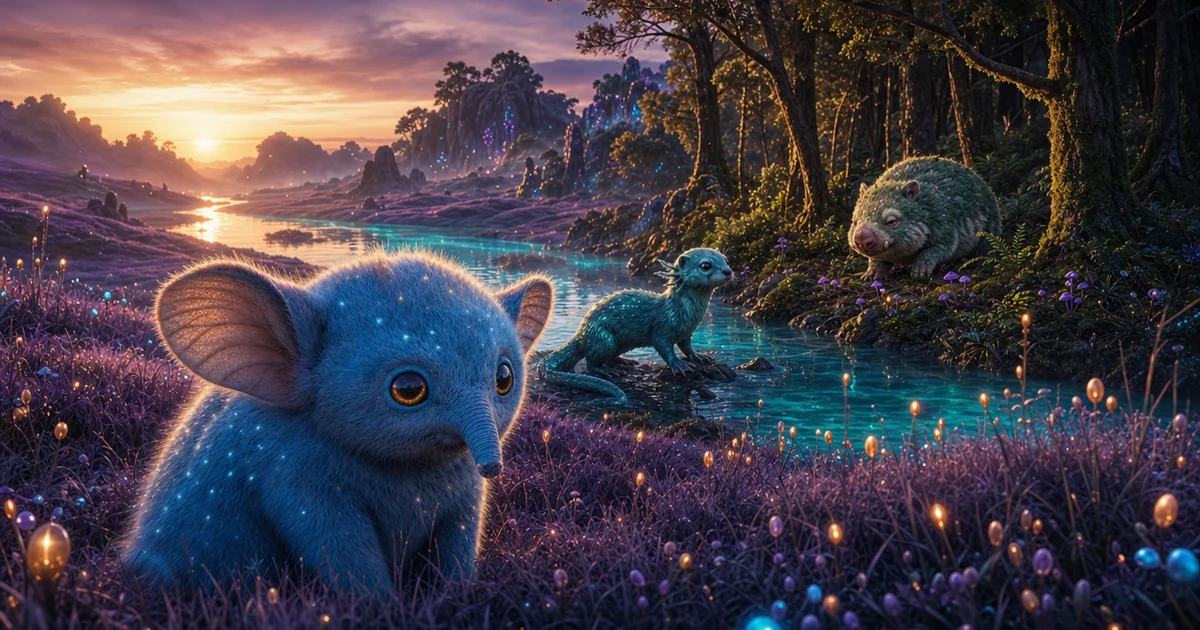
So over one evening I sat with Mateo (9), Maria (6) and Conor (4) and we invented three creatures for a glowing alien planet. A big-eared thing on the violet plains. A teal river swimmer. A round, sleepy forest digger. The kids picked the features. I kept one thing secret: each creature was named after one of them.
The finished film runs 60 seconds. When Conorín, the little forest creature, appeared on screen, Mateo and Maria worked out the names and started howling. Conor walked into the room at that exact second, saw his own creature, and had no idea why. We caught the whole thing on camera.
This guide shows you the exact tools, the prompts, what drifted wrong, and how to run the same project with your own kids.
Quick overview
- Time: 2+ hours for your first one, mostly re-generating clips
- Cost: A paid Kling plan (from $6.99/mo) plus ChatGPT Plus ($20/mo). Free tiers work but watermark and cap you.
- Difficulty: Intermediate. Three tools, and a lot of re-rolling.
- Age range: 4-10 years for the designing and watching. Parent runs the tools.
- Key learning: Lock one photoreal look, then keep every creature and shot consistent with it.
- What you'll create: A 60-second nature documentary where your kids are the wildlife.
What you'll need
Tools:
- ChatGPT or Nano Banana 2 (Google) for the creature images. ChatGPT Plus is $20/mo. Nano Banana is free in the Gemini app.
- Kling 3.0 to animate the still images into video. Free tier is watermarked; paid from $6.99/mo.
- ElevenLabs for the Attenborough-style voice over. Free tier covers a 60-second script.
- Any basic editor (or ffmpeg) to stitch the clips and lay the voice and music underneath.
Your kids' input:
- Three creature ideas. Ask what colour, how big, where it lives, what it eats, how it moves.
Parent skills:
- Copying and adjusting prompts. Patience for re-generating clips. No design or editing background needed.
Not sure which tool is right for your child?
Take our free 2-minute quiz and get personalized AI tool recommendations based on your child's age and interests.
Step-by-step process
The workflow is three stages. Design a photoreal creature image, animate it in Kling, then narrate and stitch. Do one creature fully before starting the next.
Step 1: Design each creature with your kids
Sit with your kids and agree the features out loud. We did three: a plains creature, a river creature, a forest creature. Write down each one in a single sentence you can paste into a prompt.
The secret ingredient: name each creature after one of your kids, and do not tell them. Mateíto, Mariíta, Conorín. That reveal is the whole payoff.
Step 2: Generate a photoreal base image
Generate a still of each creature. Push hard for a real wildlife photograph look, because the animation tool will exaggerate anything cartoonish.
The prompt pattern I used (swap the creature description):
A National Geographic wildlife photograph of a small wild alien creature on a distant planet. [YOUR KID'S CREATURE: e.g. round fluffy body, powder-blue fur, oversized ears, big amber eyes, a little trunk]. Sitting in violet alien grass at dusk, glowing seed-pods behind it. Shot on a 200mm telephoto lens, shallow depth of field, warm golden-hour light, photorealistic fur detail. Not an illustration, not a 3D render, not a cartoon, no oversized anime eyes. No text, no watermark.
Result: The last two sentences matter most. Without the "not a cartoon" line, the images drifted Pixar every time.
💡 Parent Insight: Give all three creatures the same planet details (violet plants, glowing seed-pods, warm low light). That shared world is what makes three different animals feel like one documentary.
Step 3: Animate the still in Kling
Upload each still to Kling 3.0 and animate it. Keep the motion small. Kling invents extra movement when you let it, and that is when creatures morph.
The animation prompt that stopped the drift:
Slow push in as the creature breathes gently and its ears twitch. Calm, observational nature-documentary pacing. Subtle motion only. Keep it photorealistic throughout. Do NOT stylise or cartoonify. Do NOT open its mouth or change its shape.
Result: My first clip looked great for three seconds then turned into a glossy cartoon. Adding the "do not" lines fixed it on the re-run.
💡 Parent Insight: Use Kling's multi-shot feature. One generation gives you a wide shot, a behaviour shot, and a close-up of the same creature, all consistent. It saved me hours.
Step 4: Write and generate the narration
Write a short, hushed voice over. Present tense. One or two sentences per creature. Leave pauses. Aim for about 110 words for a 60-second film.
One creature's line, as an example:
"Here, among the violet grasses, the Mateíto ventures out. No larger than a house cat, it trusts those enormous ears to catch the faintest sound, long before danger can find it."
Generate it in ElevenLabs with an older British male voice. Pick an Attenborough-style voice, not a clone of the real person.
Step 5: Add an opening and closing world shot, then stitch
Generate two wide landscape images of the whole planet, one at dusk and one at night. These bookend the film and give it a beginning and an end. Then stitch the order: opening world, each creature, closing world. Lay the voice over on top and a soft music bed underneath.
Result: Opening dusk, three creatures, closing night. A 57-second film that reads as one quiet evening on one planet.
What worked
The photoreal look sold the whole thing
The joke only lands because it looks real. The images that read as genuine wildlife photos, with normal-sized eyes and telephoto blur, were the keepers.
Lesson: Bake "real wildlife photograph, not a cartoon" into every image prompt.
The secret naming reveal
The kids helped design the creatures but did not know the names. When Mateo and Maria realised the animals were them, they lost it. Conor walking in mid-laugh was pure luck we happened to be filming.
Lesson: Keep one surprise back for the reveal. Film their first watch.
Kling multi-shot for consistency
One multi-shot generation produced a wide, a behaviour beat, and a close-up of the same creature that all matched.
Lesson: Generate angles from one locked image, not three separate ones.
What didn't work
Kling images went cartoon
Kling's own still images came out with huge glossy eyes and a watermark. The photoreal look came from ChatGPT and Nano Banana instead.
Lesson: Make the base image elsewhere. Use Kling only to animate.
Long clips drifted
A continuous 6-second clip started photoreal and ended looking like a Pixar character. The mouth opened and the shape changed on its own.
Time wasted: Two full re-generations before I added the "do not change shape" wording.
Lesson: Keep clips short and constrain the motion in the prompt.
The voice over needed a re-record
I generated the narration, then changed the creature names afterwards. That meant re-recording the whole voice over.
Lesson: Lock the names before you generate any audio.
Why this workflow holds together
Three separate tools sounds like a lot. It works because each one does the single job it is best at. ChatGPT and Nano Banana make a believable still. Kling brings that exact still to life without you describing the animal again. ElevenLabs supplies the voice that ties it to the nature-documentary format your brain already trusts.
The consistency is the hard part, and it is worth the effort. A documentary shows the same animal from several angles, so each creature has to look identical across shots. That is why you lock one image and animate from it, rather than generating a fresh creature every time. The shared planet details do the same job at the world level. Violet plants and glowing seed-pods in every frame make three unrelated animals read as neighbours.
The learning curve is mostly patience. Expect to re-generate clips. The prompts in this guide are the ones that survived that trial and error, so you should hit a good result faster than I did.
Getting the most out of the tools
Before you start:
- Agree all three creatures and their secret names first, so you never re-record audio.
- Write one shared "planet" sentence and paste it into every image prompt.
During the process:
- Finish one creature end to end before starting the next.
- Keep behaviour shots gentle. Fast movement gives you motion blur you cannot use.
- Trim each clip to its sharpest few seconds. Do not force yourself to use a whole generation.
What I'd do differently:
- Lock the names on day one. That single mistake cost me a full voice-over re-record.
Tool comparison
ChatGPT ($20/month)
- Pros: Most photorealistic single image. No watermark.
- Cons: Harder to keep the exact same creature across separate generations.
- Best for: The hero still of each creature.
Nano Banana 2 (free in Gemini)
- Pros: Best at keeping a creature consistent across edits. Free.
- Cons: Leans slightly animated unless you push the photoreal wording.
- Best for: Generating matching angles of a locked creature.
Kling 3.0 (from $6.99/month)
- Pros: Multi-shot gives several consistent angles in one go. Strong motion.
- Cons: Drifts to cartoon on long clips. Watermarks its own free-tier images and video.
- Best for: Animating a still you made elsewhere.
The deciding factor for us: ChatGPT set the look, and Kling's multi-shot brought it to life without losing the animal. That pairing is the core of the whole project.
Common issues and solutions
Problem: The creature looks like a cartoon.
Solution: Add "photorealistic wildlife photograph, not an illustration, not a 3D render, not a cartoon, no oversized anime eyes" to the image prompt. Make the still in ChatGPT or Nano Banana, not in Kling.
Problem: The animal changes shape or opens its mouth mid-clip.
Solution: Add "subtle motion only, do not change its shape, do not open its mouth" to the Kling prompt. Keep clips to five seconds.
Problem: The three creatures look like they are from different films.
Solution: Give every image the same planet details and the same lens and light wording. Consistency lives in the shared background, not just the animal.
Problem: A behaviour shot is blurry.
Solution: Slow the movement down in the prompt, or trim to a still moment. Fast motion plus a moving camera gives unusable blur.
Problem: The voice mispronounces the invented names.
Solution: Spell them phonetically for the generation, for example "Mah-ree-EE-ta". Lock names before generating audio so you never re-record.