The magic marker trick: we drew a cartoon sloth into our real holiday video
ON THIS PAGE
Subscribe To Get Weekly Family AI Discoveries

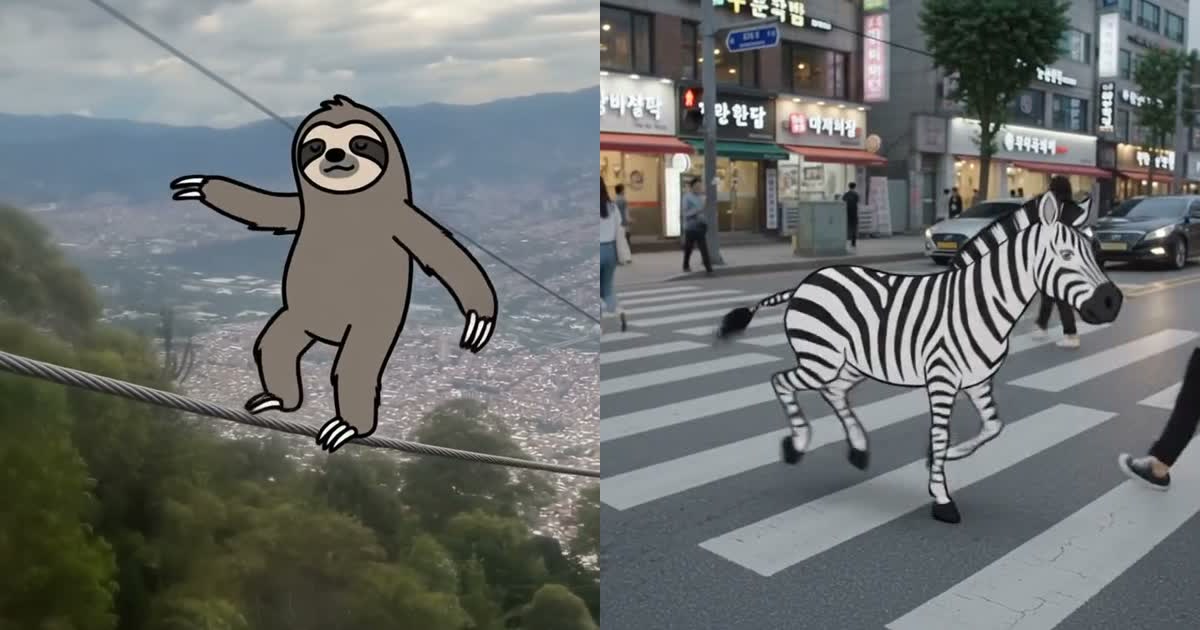
A video went viral on X this week. A hand draws a squiggle over real street footage with a black marker, and the squiggle comes to life as a cartoon. A zebra crossing became an actual zebra. The green man walked out of the traffic light.
The creator shared the finished video but not his prompts. So I reverse-engineered them frame by frame, rebuilt his opening scene, then pointed the trick at our own footage: the cable car video I shot over Medellín on the last day of our Colombia trip. Two minutes later a hand-drawn sloth was tightrope-walking the actual cable outside our cabin window.
The kids’ creature picks are round two. When I tried two more clips with the children visible in frame, the AI refused both. That refusal turned out to be the most reassuring thing I learned all weekend, more on that below.
This guide has the exact prompt, what each generation costs, the mistakes that wasted my first attempts, and the one sentence that makes the whole trick work.
Quick overview
- Time: 30 minutes for your first clip, plus generation waits
- Cost: Google AI Plus subscription. I pay €1.29/month on an intro offer; standard rate is €4.99/month (prices vary by region)
- Difficulty: Beginner. Copy the prompt, swap one line
- Age range: 5-12 yrs. Kids direct, a parent operates
- Key learning: state the rules of the world first, then keep the action simple
- What you’ll create: a 10-second video where a cartoon your child chose comes alive inside your real family footage
What you’ll need
Tools:
- Gemini with video generation (Google AI Plus plan or higher, €4.99/month standard, intro offers as low as €1.29/month). The free tier does not include video generation
- Roughly 2 video generations every 2-3 hours on the Plus plan, so plan before you spend one
Your child’s input:
- One creature and one funny thing it does. That is the whole creative brief
- A 5-10 second video clip from your phone. Steady shots with one clear line or surface work best: a cable, a road, a beach, a table
Parent skills:
- Copy and paste. The prompt below does the heavy lifting
EU parents: uploading your own video is not available in the EU right now (I hit this the day we landed home in Ireland). Workaround: upload a still photo taken from the video instead. The effect still works, the camera motion is AI-made instead of yours.
Not sure which tool is right for your child?
Take our free 2-minute quiz and get personalized AI tool recommendations based on your child's age and interests.
Step-by-step process
Step 1: pick the right clip
5-10 seconds, steady, with one obvious stage for the cartoon to perform on. Our metrocable cable was perfect: the strongest line in the shot. Avoid busy clips with lots of moving people close to the camera.
Step 2: let your child pick the creature and the gag
One creature, one action. Ours was a sloth because the cable was already the star of the shot. My sloth walked the cable like a tightrope, slipped, and hung on by one arm. That is a complete story in 9 seconds.
💡 Parent Insight: Resist the urge to cram in more. My first recreation of the viral video asked for three transformations in one generation and produced a mess. Every good result since has been one creature doing one funny thing.
Step 3: paste the prompt
The first paragraph is the trick. It tells the AI the rules of the world before any action:
Concept: a magic black marker doodles on the real world, and whatever it squiggles comes to life as a flat hand-drawn cartoon inside the hyperrealistic footage. The world stays completely photoreal; only the marker’s creations are cartoons. The marker never writes letters or words, it only draws pictures.
[One line describing your footage, for example: “Vertical phone video from inside a moving cable car looking down over a hillside city, steel cables crossing the frame.”]
A real hand holding a thick black marker enters from the bottom of the frame, does a quick playful squiggle, and the squiggle instantly transforms into [CREATURE], which [ONE FUNNY ACTION with real physics]. It keeps correct perspective and scale, with a soft contact shadow, and the real world stays photorealistic behind it.
Audio: [background sounds matching your clip], a soft marker squeak on the squiggle, a playful pop when [CREATURE] appears. No on-screen text, no letters, no words, no captions.
Step 4: generate and review together
About 2 minutes per generation. Watch it with your child and spot-check together: does the creature actually touch the ground or the line? Do people pass in front of it? Kids are brilliant at spotting the physics mistakes.
Step 5: regenerate once if needed
About one in two of mine needed a second attempt. Change the prompt only where it failed and keep every other word identical.
What worked
The premise sentence
Every attempt that opened with the rules-of-the-world paragraph produced the effect. My early attempts without it produced muddled, half-cartoon footage.
Lesson: tell the AI what kind of world it is in before you tell it what happens.
One creature, one action
The sloth clip worked on the first real attempt on our own footage: squiggle, sloth, tightrope walk, slip, one-armed wave as the city slides past below.
Lesson: a 10-second video has room for exactly one gag.
What didn’t work
Overloading the prompt
My first recreation of the viral video asked for three transformations in one generation. It produced two different zebras and a floating caption.
Time wasted: 2 generations. Lesson: one prompt, one gag.
Words near the magic moment become graffiti
I wrote a “Biu!” pop sound in quotes and the AI painted the word on screen. Later the phrase “the squiggle takes” made the marker handwrite “takes” on the pavement.
Lesson: describe sounds in a separate sentence, avoid quoted words, and add “the marker never writes letters or words, it only draws pictures”.
Clips with children’s faces up close get refused
I tried two clips where kids’ faces filled the frame: a fairground ride and bumper boats. The safety filter blocked both, every attempt. Honestly, this is the good kind of refusal: the AI will not generate video of real children’s faces.
Lesson: pick clips where people are small in frame, facing away, or absent. Scenery-plus-one-cartoon clips work every time, and they are also the clips you’d feel comfortable sharing anyway.
💡 Parent Insight: This filter is worth showing your kids as a talking point: the tool refused to animate real children. Ask them why they think that rule exists. It is one of the better AI safety conversations we have had in this house.
Platform comparison
Gemini (Google AI Plus, from €4.99/month): kept our real footage untouched and only added the drawing. The sloth landed on the actual cable with a shadow. Best result by far. Limits: roughly 2 videos per 2-3 hours, and the EU video-upload gap.
Kling (same prompt, same clip): re-rendered the whole scene soft and dreamlike, lost the marker after one blurry frame, and the sloth, which came out looking more like a meerkat, kept letting go of the cable and floating beside it. Watermark on every frame.
Verdict: this trick lives or dies on the tool leaving your real footage alone. Gemini does. Kling does not.
Getting the most out of the trick
Before you start:
- Match the creature to what is already in your footage. Our sloth walked the cable because the cable was the strongest line in the shot. A zebra crossing becomes a zebra. Site-specific gags land best
- Plan clips and creatures on paper first. Generations are rate-limited, so spend them on decided ideas
During the process:
- Save your premise paragraph and reuse it word for word. Only swap the footage line and the creature line between clips. Keeping the block identical keeps the style consistent
- Let each child own a clip rather than sharing one, and let them pick the creature and the gag. The picking is half the fun
What I’d do differently:
- Start with the scenery clip, not the family-action clip. I burned my first attempts on footage the safety filter was always going to refuse
Common issues and solutions
Problem: the cartoon looks 3D or realistic instead of flat.
Solution: add “completely flat, bold black outlines, like a drawing pasted into reality” to the style line.
Problem: words or captions appear in the video.
Solution: keep “No on-screen text, no letters, no words, no captions” as the final sentence, move sound descriptions out of quotes, and keep the “only draws pictures” line in the premise.
Problem: the creature floats or ignores objects.
Solution: name the surface it stands on: “standing on the cable with correct perspective, scale and contact shadows”.
Problem: “Editing uploaded videos isn’t available in your region”.
Solution: EU restriction. Use a still frame from your video as the reference image instead.
Problem: generation limit reached.
Solution: the Plus plan allows roughly 2 videos every 2-3 hours. Decide your next clip and creature while you wait.