I Turned Myself Into a Colombia International With a 15-Second AI Interview
ON THIS PAGE
Subscribe To Get Weekly Family AI Discoveries

The World Cup is in full swing, and Colombia played their first match on Thursday against Uzbekistan. It was tight in the first half, then they won it 3-1. Colombians are fiercely patriotic about the Selección, and so is my Colombian family, so I had a bit of fun and tested an AI workflow on myself first.
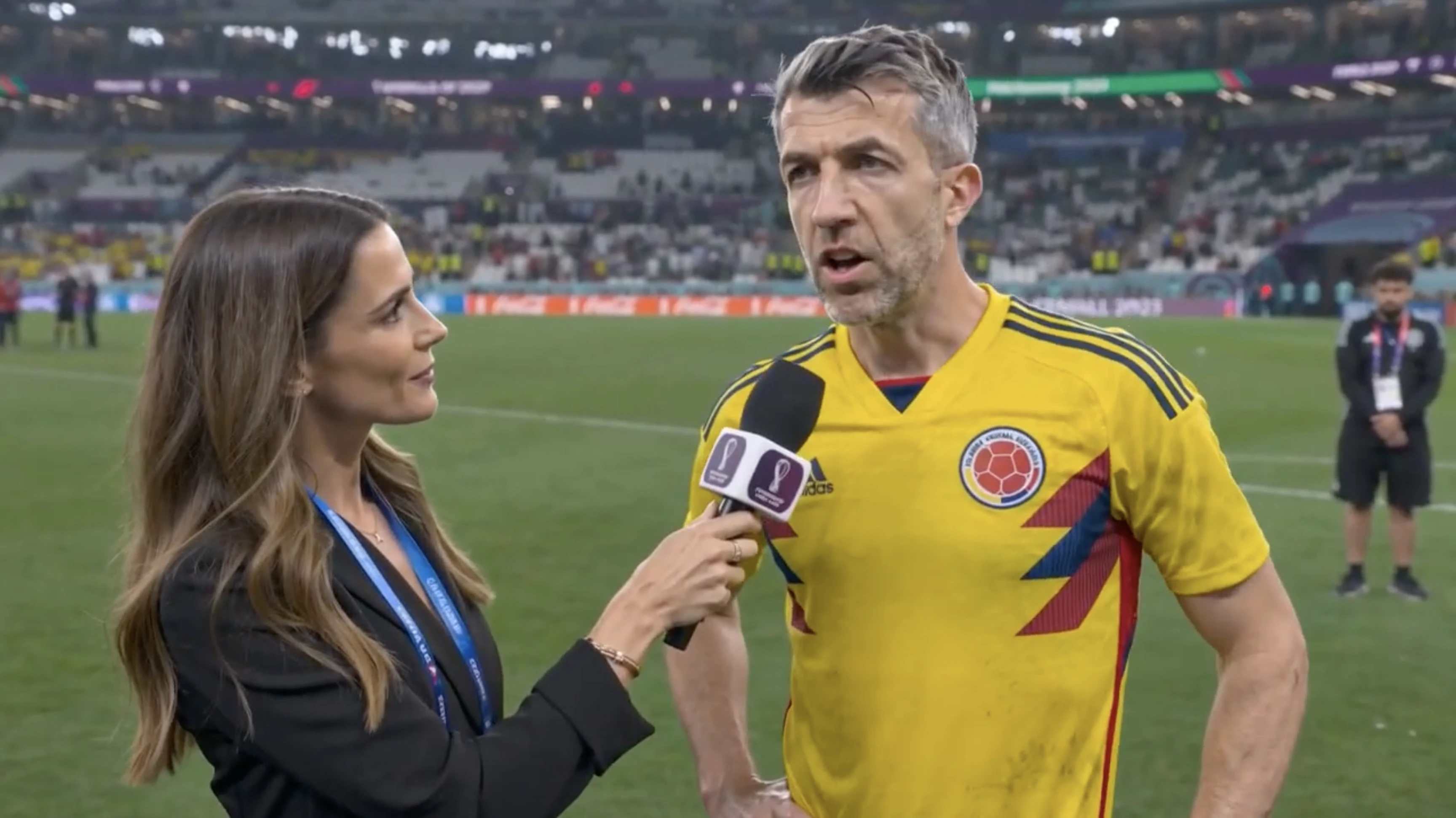
I copied a workflow from a viral post that predicted AI-generated sports interviews. I fed one selfie into two AI tools, Nano Banana and Seedance, both run through Higgsfield. About 20 minutes later I was standing on a World Cup pitch in the Colombia national team kit, sweating, being interviewed by a reporter after the game.
The result was a 15-second broadcast clip that made me do a double take. It was not perfect. It aged my face by about five years and gave me an English accent, which for an Irishman is the real crime.
This guide gives you the exact two prompts, the settings that matter, what worked, the two flaws and how to fix them, so you can do it with your own child.
Quick overview
- Time: About 30 minutes
- Cost: Free tier or low credits on Higgsfield (Nano Banana + Seedance)
- Difficulty: Intermediate (two tools, a little prompt tweaking)
- Age range: 6-12 years, supervised
- Key learning: One clean photo plus a short prompt builds a whole scene
- What you will create: A 15-second pitchside post-match interview starring your child
What you will need
Tools:
- Nano Banana (Google image model, via Higgsfield) for the portrait
- Seedance (via Higgsfield) for the interview video
- A video editor like CapCut (free) for the finishing touches
Your child’s input:
- One clear, front-facing, well-lit photo of their face
- The team they want to play for and three short interview answers
Parent skills:
- Copy and paste a prompt and swap in your details. No design skill needed.
Not sure which tool is right for your child?
Take our free 2-minute quiz and get personalized AI tool recommendations based on your child's age and interests.
Step-by-step process
The workflow is two stages. First you make a clean broadcast portrait in the team kit. Then you feed that single image into Seedance, which builds the whole pitchside scene around it, reporter, stadium and spoken dialogue included.
Step 1: Take the photo
Use one clear, front-facing photo of your child’s face in good light. No hats, no sunglasses, no shadows. This single image carries the face and the likeness through the whole project, so a good photo here saves you re-rolls later.
Step 2: Generate the broadcast portrait in Nano Banana
Upload the photo to Nano Banana and paste this. Swap the team for whichever one your child wants, and set the output to 16:9.
Using the uploaded photo, generate a hyper-realistic official sports media-day portrait of this person as a professional footballer wearing the full current home kit of the Colombia national team. Match the face exactly to the photo. Do not age, weather or beautify the face. Medium close-up, shoulders and head visible, looking at the camera with a calm, focused expression. Clean deep navy studio background. 16:9. No lower-third, no name bar, no text or graphics overlay of any kind.
Result: a clean studio portrait in the yellow Colombia kit, navy background, no graphics. Re-roll until the face is spot on. A strong still makes the next step easy.
💡 Parent Insight: Add the line "do not age or weather the face" every time. My first attempt made me look about five years older, which is the model trying to look "pro athlete." The instruction reins it in.
💡 Pro Tip: If the team crest or kit looks off, upload a reference photo of the actual shirt alongside the face photo. It matches the design far better than text alone.
Step 3: Write the interview
You play the reporter, your child is the hero. Keep each line short so the video stays clean. Three exchanges is plenty. Here is the set I used:
Reporter: "Talk to me about the game. Did you expect such a tough opponent?" Player: "There are no easy games at a World Cup. We stay focused, the next one is Tuesday."
Let your child write the answers. The bragging is the fun part, and it sneaks in some real practice at speaking and scripting.
Step 4: Generate the interview video in Seedance
Feed the 16:9 portrait from Step 2 into Seedance as the reference image, set the output to 16:9 and the longest clip length available, then paste this. Keep it short, the image already shows the kit.
after match interview at a World Cup stadium, pitchside. The person in the reference image dressed as a soccer player, tired, sweating, being interviewed by a reporter next to him. Reporter says: "[your question]". Player replies: "[your answer]". real soccer TV Broadcast
Result: from one still, Seedance builds the reporter, the microphone, the stadium, the crowd and the spoken dialogue. My version came out as a believable 15-second clip of a World Cup interview.
💡 Parent Insight: You do not need any fancy node setup. The original creator used a tool called Magnific Spaces, but that is just a wrapper. The engine underneath is Nano Banana, which you ran directly in Step 2.
Step 5: Finish it in CapCut
Drop the clip into CapCut and add a lower-third with your child’s real name and the team, plus a score bug in the corner. Real, sharp text beats anything the AI tries to write. Two minutes, and it looks like Match of the Day.
What worked
One image built the whole scene
The biggest surprise was how much Seedance did from a single studio portrait. I expected to animate a talking head. Instead it generated the reporter, the pitch, the floodlights and the crowd, all framed like real TV.
Lesson: let the still carry the face and kit, and let the prompt carry the scene. Do not over-describe the kit in the video prompt.
The kit and face held up
The Colombia yellow, the adidas mark and the federation crest all came through, and the face stayed recognisable across the clip.
Lesson: a clean, well-lit start photo does most of the heavy lifting.
It made the family laugh
I showed it to Mateo (8) and to my Colombian family. Mateo loved it, and my family thought it was hilarious, a fake clip of me reacting to a Colombia win as if I had played in it. We are making one of Mateo next.
Lesson: the personal angle is what sells it. Use a team your family actually cares about, not a random one.
What did not work
It aged the face
The first portrait made me look about five years older. The model weathers a face to read as a "pro athlete."
Lesson: add "do not age or weather the face" to the portrait prompt and re-roll.
The accent was wrong
Seedance generated the dialogue in an English accent. For an Irish dad, that broke the illusion fastest.
Lesson: if the voice matters, record your child’s real voice or use a voice tool, then run the clip through a lip-sync pass so the mouth matches.
Why this works
The trick is the split of labour. The image model is good at a faithful likeness in a fixed kit. The video model is good at motion and scene. Hand each one the job it is strong at and the result holds together. A year ago this took a studio. Now it takes one photo, two prompts and 20 minutes at the kitchen table.
Getting the most out of it
Before you start:
- Shoot the photo near a window for soft, even light
- Pick a team with a bold kit colour. It pops against the navy background
During the process:
- Generate the portrait at 16:9 from the start, not square, so the video framing stays clean
- Keep the interview answers to one or two sentences so the lip movement stays believable
- Set the longest clip length so the full answer does not cut off
What I would do differently:
- Record the voice first in your own accent, then lip-sync, rather than accepting the default voice
- Leave a little more empty background to one side so the reporter has room to appear
Common issues and solutions
Problem: The face looks too old
Solution: add "do not age, weather or beautify the face" to the portrait prompt and generate again.
Problem: A lower-third or garbled text appears on the image
Solution: add "no lower-third, no name bar, no text or graphics overlay" to the prompt, and add the text yourself in CapCut.
Problem: The reporter looks cramped or warped
Solution: use a 16:9 portrait with a bit of empty space to one side, or re-roll the video a take or two.
Problem: The dialogue cuts off
Solution: shorten the answer, or set the longest clip length your plan allows.
Problem: The kit or crest is wrong
Solution: upload a reference photo of the real shirt next to the face photo so the model matches the design.