How We Revealed Our Family Holiday with a Treasure Hunt (& AI Help)
ON THIS PAGE
Subscribe To Get Weekly Family AI Discoveries

We were leaving for Tenerife in less than 3 hours. The bags weren't packed. The kids had no idea.
I wanted to create a memorable reveal. Not just "hey, we're going on holiday." Something they'd remember. Something special.
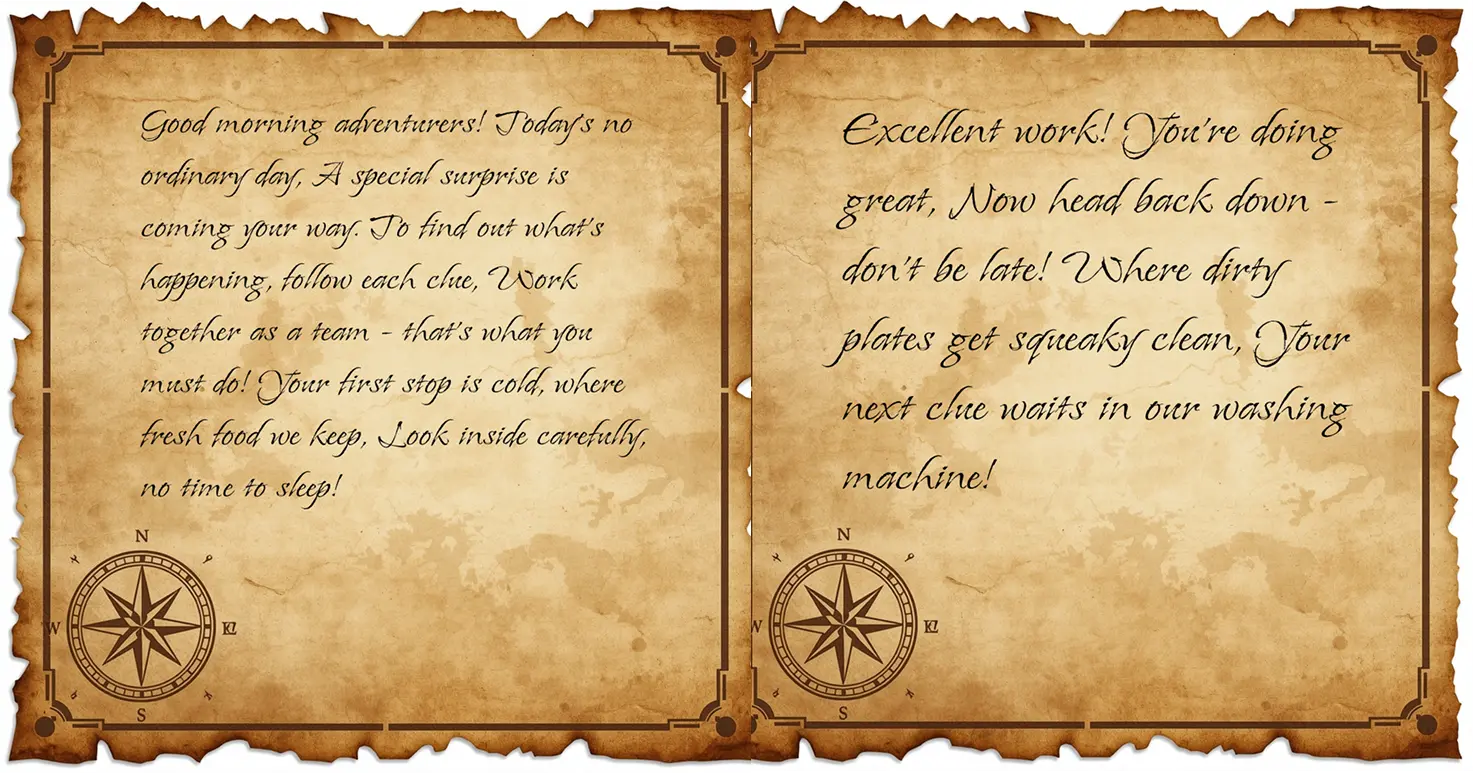
I've done treasure hunts before. Usually just printed clues on plain paper. This time I used Leonardo AI to create one treasure map image, then ChatGPT to generate rhyming clues. Seven locations around our house and neighborhood.
Total time: 30 minutes to create everything. 15 minutes for the hunt itself.
The final clue led them to an empty suitcase in our side passage with a handwritten note: "Pack your bags. We're going to TENERIFE! Grandad is picking us up in 2 hours!"
Mateo (8) read it first. Moment of silence. Then jumping, hugging, celebrating. Maria (6) immediately grabbed the flight map to see where Tenerife was. Conor (3) went along with the excitement, not fully understanding until they ran upstairs to pack.
Here's exactly how we created this treasure hunt. The AI tools that helped. How you can replicate this for your next family surprise.
Quick overview
- Time: 30 minutes to create, 15 minutes to execute
- Cost: £0 (used free Leonardo AI tokens)
- Difficulty: Beginner (simple AI prompts, basic design)
- Age range: 3-12 years (all three kids engaged)
- Key learning: Coffee staining adds magic (but optional)
- What you'll create: 7 treasure hunt clue cards revealing your surprise
What you'll need
AI Tools:
- Leonardo AI (Free account. 150 fast tokens daily. I used 142 tokens for one image)
- ChatGPT or Claude (Free account for clue generation)
Physical Materials:
- Printer (regular paper works fine)
- Coffee for aging effect (optional but magical)
- Light paintbrush
- String or ribbon for wrapping clues
- Scissors
- Hairdryer (optional, speeds up drying)
Design Tools:
- Figma (free) OR Canva (free) for text overlay
Parent Skills:
- Willingness to get messy with coffee
- Basic text overlay in design software
- Ability to hide things around your house
Time Investment:
- Leonardo image generation: 20 seconds
- Figma text overlay: 3 minutes
- Printing and coffee staining: 10 minutes (with hairdryer)
- Hiding clues: 5 minutes
- Total: 30 minutes
Optional:
- Suitcase or bag for final reveal
- Handwritten note for personal touch
- Map showing destination (Maria loved studying this)
Not sure which tool is right for your child?
Take our free 2-minute quiz and get personalized AI tool recommendations based on your child's age and interests.
The AI tools we used
Leonardo AI - For the Treasure Map Background
Why Leonardo: Free daily allowance (150 fast tokens). One generation was all I needed. Kid-friendly, professional results. Multiple models to choose from.
Model Used: Lucid Origin (best for detailed, stylized images)
Settings: 1024x1024 resolution
Cost: 142 tokens (out of my free 150 daily allowance)
Time: 20 seconds
ChatGPT/Claude - For Clue Generation
Why AI for clues: Faster than brainstorming rhyming clues yourself. Can customize to your specific house locations. Maintains consistent tone and difficulty level. Ensures clues build excitement without giving away the surprise.
What I provided:
- List of 7 locations (fridge, under bunk bed, dishwasher, upstairs toilet mirror cabinet, under TV chest of drawers, Dylan's community library, side passage)
- Kids' ages
- The surprise (Tenerife holiday)
- Request for rhyming clues that build excitement
Time: 2 minutes to get all 7 clues
Figma - For Text Overlay
Why Figma (you could use Canva instead): Clean, simple text overlay. Multiple frames for efficient workflow. Easy export to PNG. Font flexibility.
Font Used: "Island Moments" (handwritten style from Google Fonts)
This was key. It looked like someone had written notes on an old treasure map.
Step-by-step process
🗺️ Step 1: Plan Your Treasure Hunt Route
Before touching any AI tools, map out your route.
I chose 7 locations:
- Fridge (easy start, inside)
- Under bunk bed (upstairs)
- Dishwasher (back downstairs)
- Mirror cabinet in upstairs toilet (back upstairs)
- Under chest of drawers where TV sits (downstairs)
- Dylan's free library exchange (outside, few streets away)
- Side passage (final location with suitcase)
Why this route worked:
- Mixed indoor/outdoor for variety
- One neighborhood location (Dylan's library) made it feel like an adventure
- Zigzag pattern (up/down stairs) kept them moving and engaged
- Final location was slightly hidden (side passage isn't obvious)
Time to plan route: 5 minutes while having coffee
💡 Pro tip: Think about accessibility for your youngest child. Conor (3) could reach everything except the mirror cabinet, which Mateo and Maria handled.
💬 Step 2: Generate Your Clues with AI
I used ChatGPT, but Claude works identically.
My exact prompt:
Create a 7-clue treasure hunt for kids ages 8, 6, and 3 to reveal a surprise family holiday to Tenerife. The clues should: rhyme and be age-appropriate, build excitement without revealing the destination until the end, lead to these locations in order: fridge, under bunk bed, dishwasher, mirror cabinet in upstairs toilet, under chest of drawers where TV sits, Dylan's free library exchange, side passage. Each clue should be 4-6 lines. Final location should lead to a suitcase with a note saying we're leaving in 2 hours.
Result: Got 7 perfectly rhyming clues in about 30 seconds.
What worked:
- Age-appropriate language (Mateo could read them easily)
- Rhyming made them fun and memorable
- Progressive difficulty (each got slightly trickier)
- Built anticipation without spoiling the surprise
Time: 2 minutes total (including copying into a doc)
🎨 Step 3: Create the Treasure Map Background in Leonardo AI
Why I chose Leonardo: My free daily allowance meant this cost me nothing. One generation was all I needed.
Login to Leonardo AI:
- Navigate to Image Generation
- Select "Lucid Origin" model (best for detailed illustrations)
- Set dimensions to 1024x1024
My exact prompt:
Blank treasure map, parchment texture, compass rose, aged paper, pirate theme, empty center space for text, vintage style, kid-friendly
Settings:
- Model: Lucid Origin
- Dimensions: 1024x1024
- Number of images: 1
- Tokens used: 142
Result: First generation was perfect. Sometimes you get lucky!
The image had: Aged parchment texture. Compass rose in corner. Pirate-themed decorative elements. Plenty of empty space in center for text. Warm, vintage color palette.
Downloaded the image as PNG.
Time: 20 seconds to generate, 10 seconds to download.
💡 Pro tip: If your first generation doesn't work, try again. Leonardo gives you 150 free tokens daily. That's usually 3-5 generations depending on settings.
🖼️ Step 4: Add Text Overlays in Figma (or Canva)
I used Figma, but Canva works exactly the same way.
Figma Workflow:
- Create new Figma file
- Upload Leonardo treasure map image
- Create 7 frames (one for each clue). Command+D to duplicate frames quickly
- Copy treasure map to all frames
- Add text boxes with clues. Font: "Island Moments" (Google Fonts - handwritten style). Size: 32pt. Color: Dark brown to match aged paper aesthetic. Position: Center of each map
- Group each frame separately (frame + text)
- Export each frame as individual PNG. Right-click → Export → PNG → Export
Why "Island Moments" font was perfect:
It looked hand-written on parchment. This small detail made the clues feel authentic, not computer-generated.
Time: 3 minutes for all 7 clues
Canva alternative: Upload Leonardo image. Use "Add text" tool. Choose handwritten font (try "Brush Script" or "Caveat"). Download each as PNG.
🖨️ Step 5: Print the Clue Cards
Printed all 7 PNGs on regular printer paper (A4).
Print settings:
- Full page (one clue per page)
- Color (to preserve the warm treasure map tones)
- Standard quality (high quality not necessary)
Time: 2 minutes
☕ Step 6: The Coffee Staining (Optional but Magical)
This is where it gets fun.
What you need:
- Brewed coffee (I used regular instant coffee, strong)
- Light paintbrush
- Printed clue cards
- Hairdryer (optional)
Method:
- Brew strong coffee (don't add milk!)
- Dip paintbrush in coffee
- Lightly brush edges of each printed clue
- Brush some streaks across the paper for aged effect
- Don't soak it. Light brush strokes only
- Use hairdryer to speed up drying (I did this)
Results:
- Edges looked genuinely aged
- Paper had vintage staining effect
- Made the treasure map aesthetic complete
Drying time:
- Natural air drying: 20-30 minutes
- With hairdryer: 5 minutes
Time: 5 minutes to stain, 5 minutes to dry with hairdryer = 10 minutes total
💡 Pro tip: Test on one page first. Too much coffee equals soggy paper. Light brush strokes equal perfect aging effect.
Reality check: Is this necessary? No. Did it add magic? Absolutely. The kids noticed the "old" appearance immediately.
🎀 Step 7: Roll and Tie the Clues
Once dry, I rolled each clue and tied it with string.
Method:
- Roll printed clue into scroll
- Tie with string/ribbon
- Create small bow
Why this mattered:
In previous treasure hunts, clues were just flat paper. The rolled and tied scrolls made it feel special. Like real treasure hunt artifacts.
Mateo's feedback: "One of them was tied too tight!" (He struggled to untie it)
Lesson: Tie them snugly but not too tight. Kids need to be able to open them.
Time: 2 minutes for all 7
📍 Step 8: Hide the Clues
Order:
- Fridge (first clue)
- Under bunk bed
- Dishwasher
- Mirror cabinet (upstairs toilet)
- Under chest of drawers (TV area)
- Dylan's free library
- Side passage (suitcase with note and map)
Special consideration: Dylan's Library
I quickly messaged Dylan to let him know the kids would be coming by. He was excited to be part of the surprise.
Final location setup:
- Empty suitcase in side passage
- Handwritten note inside: "Pack your bags. We're going to TENERIFE! Grandad is picking us up in 2 hours!"
- Printed flight map (Dublin to Tenerife arc)
Why handwritten note mattered:
Personal touch. Not everything needs to be AI-generated or printed. The contrast between the AI-designed clues and the handwritten final reveal was intentional.
Time: 5 minutes to hide everything
The execution: How it went down
Morning reveal:
Handed Mateo the starting clue at breakfast.
Team dynamics:
- Mateo (8): Lead reader. Read each clue aloud
- Maria (6) and Conor (3): The finders
- They took turns finding clues (prevented competition/arguments)
Favorite moment: Dylan's Library
The kids had to run a few streets away to Dylan's community library. This made it feel like a real adventure, not just a house treasure hunt.
Dylan's reaction: He was standing by his library when they arrived, grinning. Made it feel like the whole neighborhood was in on the surprise.
Total hunt duration: 15 minutes
Pacing:
- First 3 clues: Quick (5 minutes)
- Middle clues: Moderate (5 minutes)
- Dylan's library + final: Slightly slower (5 minutes)
The reveal:
Side passage, empty suitcase, handwritten note.
Mateo read it first: "Pack your bags. We're going to TENERIFE! Grandad is picking us up in 2 hours!"
Moment of silence (3-4 seconds).
Then: Jumping. Hugging each other. Screaming with excitement.
Conor's reaction: Went along with the celebration, but didn't fully grasp what was happening. A few minutes later, when they ran upstairs to pack, it clicked.
Maria's reaction: Immediately grabbed the flight map. Studied it carefully. Asked questions: "Is Tenerife in Spain? Why is it near Africa?" Geographic learning moment. Unplanned but perfect.
What they said:
- Mateo: "I can't believe we're going TODAY!"
- Maria: "How long is the flight?"
- Conor: "Are we going on a plane?!"
Post-reveal:
They kept the clue cards. Mateo wanted to retrace the hunt route. Maria kept studying the map.
What worked
AI Clue Generation Saved Time
Brainstorming 7 rhyming clues myself? Would've taken 30+ minutes and been frustrating. AI gave me polished, age-appropriate clues in 2 minutes.
Lesson: Use AI for the brainstorming/creation phase, then customize if needed.
Coffee Staining Created Magic
The kids immediately noticed the "old" appearance. Mateo said, "These look like real pirate maps!" Small detail, huge impact.
Lesson: Analog touches (coffee, handwriting) complement digital tools perfectly.
The Neighborhood Clue Made It Special
Dylan's library was the highlight. Getting to leave the house made it feel like a real adventure, not just a house-based activity.
Lesson: One external location elevates the whole experience.
Age Appropriate Teaming
Mateo read, Maria and Conor found. This prevented reading frustration for the younger two and competition between all three.
Lesson: Assign roles based on strengths.
Handwritten Final Note Added Authenticity
Everything was AI-generated and printed except the final note. That personal touch mattered.
Lesson: Don't over-automate. Some things should stay human.
The 2-Hour Countdown Added Urgency
"Grandad is picking us up in 2 hours!" created immediate excitement and urgency. They didn't have time to process or overthink. They just had to pack and go.
Lesson: Real-time constraints amplify excitement.
Tips for your family
Customize Locations to Your Home
Use familiar spots that kids know. The fridge, their bedroom, dishwasher. These are exciting because they're everyday places being used in a new way.
One External Location is Perfect
You don't need many outdoor clues. One (like Dylan's library) made it feel like an adventure. More than two might lose younger kids' attention.
Coffee Staining is Optional but Worth It
Adds 10 minutes. Creates 100% more "wow factor." Up to you whether time allows.
Use Handwriting for Final Reveal
Everything can be printed except the final note. That human touch matters.
Don't Overthink the AI Prompts
My first Leonardo prompt worked. My first ChatGPT clue prompt worked. These tools are good enough now that simple, clear requests usually succeed.
Test Your Route
Before hiding clues, walk the route yourself. Make sure younger kids can reach everything (or assign older siblings to help).
Capture the Moment
Phone camera ready. You won't regret having video of the reveal.
Consider Time Constraints
We had 2 hours before leaving. This created urgency. For birthdays or non-time-sensitive reveals, you could do a longer, more elaborate hunt.
Other ways to use this
Birthday Announcements: Final clue leads to wrapped present or birthday cake.
Pregnancy Reveals: "You're going to be a big brother/sister!"
New Pet Announcements: Final clue leads to a puppy/kitten (if you're brave enough).
Moving House: "We're moving to [new city]!"
School Achievement Celebrations: Reward for good grades, completed project, etc.
Christmas Morning: Replace traditional stocking hunt with clue-based treasure hunt to tree.
Just Because: Sometimes surprises don't need a reason. A treasure hunt on a random Saturday makes memories.
Sibling Collaboration Activity: Older kids could create hunts for younger siblings using the same process.
Grandparent Visits: "Grandma and Grandpa are coming to visit!"
The beauty of this method: Once you have the Leonardo treasure map template and understand the workflow, you can reuse it for any surprise. Just regenerate clues, reprint, restain, hide.
Common issues and solutions
Problem: Leonardo image doesn't look right
Solution: Regenerate. You have 150 free tokens daily. Try 2-3 variations. Add more specific details to prompt: "more aged," "brighter colors," "less decorative," etc.
Problem: Clues are too hard for my kids
Solution: Edit AI-generated clues to simpler language. Or give verbal hints during the hunt.
Problem: Clues are too easy
Solution: Ask AI to make them more cryptic. Add riddles instead of direct location descriptions.
Problem: Coffee staining made paper too wet
Solution: Use less coffee, lighter brush strokes. If paper gets soggy, let it dry completely before rolling.
Problem: I don't have Figma or Canva
Solution: Use any image editor. Even Microsoft Word works. Insert image, add text box, export as PDF, print.
Problem: My kids don't work well as a team
Solution: Create separate simultaneous hunts or make it a race (if competition motivates them).
Problem: I don't have a neighborhood location like Dylan's library
Solution: Use your mailbox, neighbor's front porch (with permission), garden shed, car in driveway.
Problem: I don't have time for coffee staining
Solution: Skip it. Plain printed clues still work. The content matters more than aesthetics.