How We Made an AI Cartoon With My 6-Year-Old (Storyboard to Video)

ON THIS PAGE
Subscribe To Get Weekly Family AI Discoveries

Yesterday we found a whole family of squirrels in our local park, and Maria, who is 6, has talked about nothing else since. She also has a serious devotion to the donuts from the Lidl bakery. Two obsessions, one weekend, and a question I have learned to say yes to: "Can we make something?"
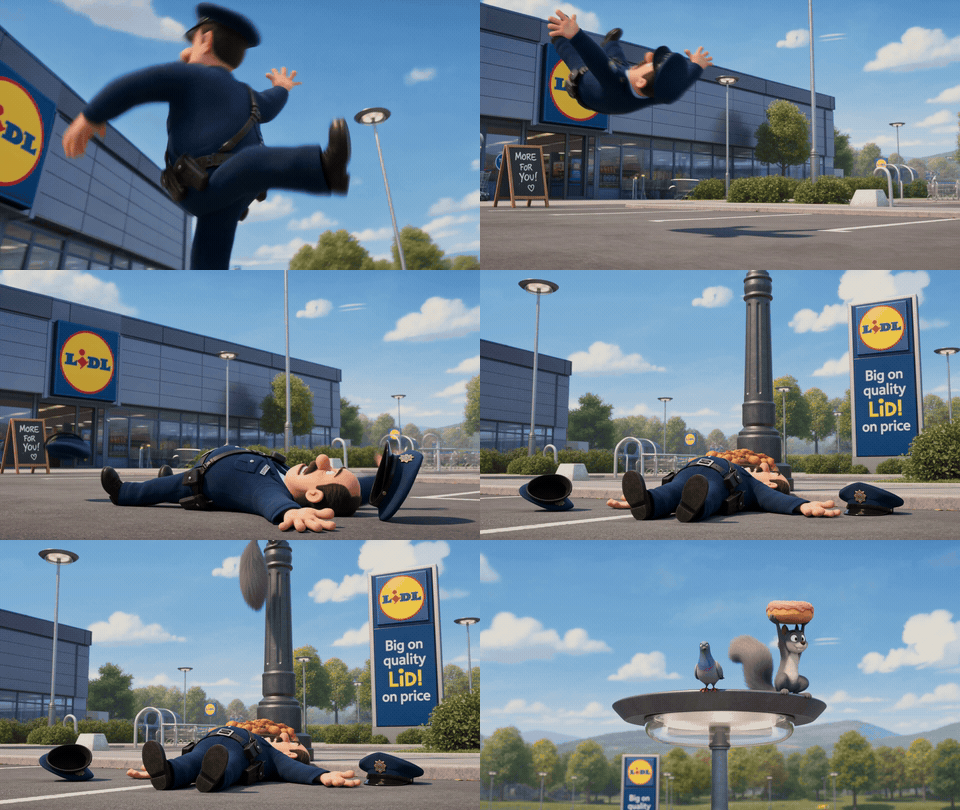
So we made a cartoon. Not a stick-figure doodle. A 14-second animated short with proper slapstick timing: a squirrel steals a giant pink donut off the Lidl counter, a Garda gives chase, and it ends the only way these things should, with a banana peel and a very undignified fall.
Here is the part worth your time. We did not animate anything by hand. We wrote the story as a storyboard with one AI tool, then handed that storyboard to a second tool that animated the whole thing in a single pass. Maria directed. I operated the keyboard.
This guide is the exact process: the two tools, the two prompts, what each one costs, the attempts that failed, and how to get a clean result without burning a pile of credits. Here is what we ended up with:
Quick overview
- Time: About 1 hour for your first one, including a few re-rolls
- Cost: ChatGPT Images 2.0 (free tier works) plus an AI video tool (paid, credit-based)
- Difficulty: Intermediate (the animation step takes 2-4 attempts)
- Age range: All ages, with a parent operating the tools
- Key technique: Storyboard first, then animate the whole sheet in one pass
- What you will create: A 10-15 second animated cartoon from your child’s own idea
What you’ll need
Tools:
- ChatGPT Images 2.0 — the free tier is enough. Draws the 8-panel storyboard.
- An AI video tool — we used Higgsfield running Seedance 2.0 (paid, credit-based). Animates the storyboard into video. Kling works too (more on that below).
- A computer and about an hour.
Your child’s input:
- One character they love (Maria picked a squirrel)
- One object or place they love (Maria picked a Lidl donut)
- A simple what happens (it gets stolen, someone chases it, someone falls over)
Parent skills:
- Copy and paste a prompt, and swap in your child’s choices
- Patience for 2-4 animation attempts
Optional:
- A second character for the chase (we used an Irish Garda)
- A daft ending (a banana peel never fails)
Not sure which tool is right for your child?
Take our free 2-minute quiz and get personalized AI tool recommendations based on your child's age and interests.
Step-by-step process
The whole trick is to separate the two jobs. First you write the story as pictures (the storyboard). Then you bring the pictures to life (the animation). Doing it in that order is what keeps your characters looking the same all the way through.
Step 1: Get your child’s three choices
Before you touch a keyboard, ask three questions. Who is the star? What do they want? What goes wrong? Maria answered squirrel, donut, and "the squirrel runs away and the policeman falls over." That is a complete story. Write the three answers down so you can drop them straight into the prompt.
💡 Parent Insight: Let the child pick something they are obsessed with this week, not something "good for a cartoon." The personal hook is what makes them watch it forty times.
Step 2: Draw the storyboard in ChatGPT Images 2.0
Open ChatGPT Images 2.0 and ask it for a full storyboard sheet, not a single picture. A storyboard sheet is a header plus a grid of numbered panels, the same thing a real animation studio plans with. Eight panels is plenty for a chase.
The prompt I used (swap in your child’s choices):
A hand-drawn animation storyboard sheet, clean line art with light colour wash, laid out as a header strip plus 8 numbered panels in a grid. Header reads PROJECT: LIDL DONUT HEIST, MOOD: FUNNY, SUBJECT: cheeky squirrel and clumsy Garda, LOCATION: Lidl bakery. Panel 1 wide shot, the squirrel sneaks into the Lidl bakery aisle. Panel 2 close on a giant pink donut, the squirrel’s eyes light up. Panel 3 low angle, the squirrel grabs the donut and leaps. Panel 4 close-up, an Irish Garda spots him and shouts. Panel 5 the chase begins through the shop. Panel 6 overhead, the Garda runs in circles. Panel 7 the Garda slips on a banana peel by the doors. Panel 8 wide payoff, the squirrel escapes up a lamppost with the donut, the Garda flat on his back. Cartoon comedy style, warm bright palette, motion arrows drawn into the panels.
Result: A clean 8-panel sheet on the first try. It even rendered the real Lidl logo and the slogan, plus a price tag on the donut. Use a 1:1 square aspect ratio so the four-across panels stay wide enough to read.
💡 Parent Insight: Generate the storyboard at the highest resolution you can. Small text in AI images gets mushy at low resolution, and your panel captions need to be legible.
Step 3: Animate the whole sheet in one pass
Upload the finished storyboard sheet to your video tool (we used Higgsfield running Seedance 2.0) and give it a motion prompt that describes the story in order. You are asking it to read the panels and animate the sequence.
The motion prompt:
Animate this storyboard into one continuous cartoon scene. A cheeky grey squirrel grabs a giant pink donut off the Lidl bakery counter and bolts. An Irish Garda gives chase, skidding around the aisles, then out through the sliding doors. The Garda steps on a banana peel, his legs fly up and he crashes flat on his back, while the squirrel scrambles up a lamppost and holds the donut high. Exaggerated cartoon physics, slapstick timing, cinematic 3D animated film look, bright daylight. Camera follows the chase then whip-pans to the fall.
Settings: 10-12 seconds, the full Seedance 2.0 model (not the Fast model). A static or simple following camera holds the look together.
Result: A polished 14-second cartoon, the full chase in a single generation. Maria watched it on a loop.
Step 4: Watch it together and pick your favourite take
Generate the animation two or three times and let your child choose the funniest one. Each run varies, one nails the chase, another nails the fall. Choosing the best take is a real part of the job, and kids are very good at it.
What worked
Storyboard first, animate second
Drawing the plan before animating is the whole game. The storyboard gives the video model a fixed reference for what the squirrel and the Garda look like, so they stay consistent across all eight beats. A cold text prompt with no storyboard drifts: the characters morph halfway through.
Lesson: Always make the storyboard sheet first, then animate it. Never skip straight to text-to-video for a multi-step story.
One pass for the whole chase
Seedance 2.0 held all eight beats in a single 14-second generation: steal, chase, circle, slip, payoff. We expected to stitch two clips together and did not need to.
Lesson: Try the full sheet in one generation before you bother cutting it into pieces.
The personal hook
Maria chose every element. The squirrel and the Lidl donut were hers, not mine. That ownership is why she sat through every re-roll and why she has shown it to everyone since.
Lesson: The child picks the cast. You run the tools.
What didn’t work
The cheaper Fast model muddled the chase
The first attempts used Seedance’s Fast model to save credits. It blurred the multi-beat action and the comic timing fell flat. The full Seedance 2.0 model handled the same prompt far better.
Credits wasted: Two Fast generations before switching.
Lesson: For anything with several actions in sequence, use the full model from the start. Fast is fine for a single simple motion, not a chase.
Garbled signage
The model rendered the Lidl slogan as "LiD!" in one frame. AI video still mangles small text.
Lesson: Frame tighter if exact signage matters, or accept it as cartoon background and move on.
It took a few tries
The banana-peel fall rushed on the first full-model run.
Lesson: Add "slow-motion on the slip and fall" to stretch the payoff, and budget 2-4 attempts.
Why this works
You are giving the AI a plan instead of a wish. Most people open a video tool, type "a squirrel robs a shop," and get a confusing blur. The storyboard removes the guesswork. It tells the model the shot order, the characters, and the beats, so the animation has something to follow.
It also teaches your child real story structure without calling it homework. A storyboard is a beginning, a middle, and an end laid out in pictures. Maria now talks about "what happens first" and "the funny bit at the end." That is sequencing and cause and effect, dressed up as a cartoon about a squirrel. Swap the three choices and the same method makes a shark who wants to fly, or a dog who drives a bus.
Getting the most out of this workflow
Before you start:
- Lock the three choices first (character, object, what goes wrong). A clear story beats a clever prompt.
- Generate the storyboard square (1:1) so all four-across panels stay readable.
During the process:
- Keep the camera simple. A static or single following shot holds the cartoon together. Fancy camera moves warp the scene.
- Describe the beats in order in the motion prompt. The model animates what you list, in the order you list it.
- Re-roll the animation 2-3 times and let your child pick. Each take is different.
What I’d do differently:
- Start on the full Seedance 2.0 model. I wasted two Fast generations learning this.
- Add "slow-motion on the fall" from the first run to nail the comic timing.
Seedance vs Kling: same storyboard, two styles
Out of curiosity I fed the exact same storyboard sheet into Kling as well. The result was fascinating and completely different. Where Seedance produced a clean, continuous finished cartoon, Kling animated the storyboard sheet itself: the panels and their captions stay on screen and the motion happens inside them, like a comic that has come to life.

Neither is "better." They are two different outputs from one input, and which you want depends on the look you are after:
- Choose Seedance 2.0 for a clean, finished animated short where the panels disappear and you get one continuous scene.
- Choose Kling for a stylised "living storyboard" or moving-comic look, where the panel layout and captions are part of the charm.
If you only have credits on one platform, both can produce a result your child will love. We have a full breakdown of each in our Higgsfield review and our Kling review.
Common issues and solutions
Problem: The characters change appearance partway through the video.
Solution: You skipped or rushed the storyboard. Generate a clean storyboard sheet first, make sure the squirrel and the chaser look right in it, then animate from that sheet. The storyboard is the model’s reference.
Problem: The chase looks blurry or the timing is flat.
Solution: You are on the Fast model. Switch to the full Seedance 2.0 model. Fast cannot hold multi-step action.
Problem: The fall happens too fast to be funny.
Solution: Add "slow-motion on the slip and fall" to the motion prompt, and lengthen the clip to 10-12 seconds.
Problem: The shop signage reads as gibberish.
Solution: Normal for AI video. Frame the shot tighter so signage is out of view, or accept it as background.
Problem: It only animates part of the story.
Solution: Shorten the action, or split it into two clips (steal and chase, then slip and payoff) and stitch them. Try the full sheet first, only split if it drops beats.
Common questions
How long it takes: About an hour for your first cartoon, including a few re-rolls. The storyboard takes two minutes; most of the time goes on 2-4 animation attempts to get the timing right.
Whether you need design skills: None. You copy two prompts and swap in your child’s character and object. The skill is choosing a clear story, not editing.
If it is safe for young children: Yes, as a parent-operated activity. The image tool is 13+ and the video tools are 18+, so an adult runs them while the child directs and watches. Review every prompt and output first.
What it costs: ChatGPT Images 2.0 is free for the storyboard. The animation runs on a paid, credit-based video tool, from roughly $7 to $15 a month.
Seedance or Kling: Seedance turns the storyboard into a clean continuous cartoon. Kling animates the storyboard sheet itself into a living-comic look. Both work from the same storyboard, so pick the style you prefer or whichever you have credits on.